Applying Profiling Condition Sets in DITAEdit online
All defined Profiling Condition Sets are available as shortcuts in the  Profiling / Conditional Text toolbar menu. Select a menu entry to
apply the condition set. The filtered content is then grayed-out in the
Author mode, Outline
view, and DITA Maps
Manager view (for DITA documents). Your selection will also be used as
the default condition set
in transformation scenarios. An element is filtered-out when one of its attributes is part of
the condition set and its value does not match any of the value covered by the condition
set.
Profiling / Conditional Text toolbar menu. Select a menu entry to
apply the condition set. The filtered content is then grayed-out in the
Author mode, Outline
view, and DITA Maps
Manager view (for DITA documents). Your selection will also be used as
the default condition set
in transformation scenarios. An element is filtered-out when one of its attributes is part of
the condition set and its value does not match any of the value covered by the condition
set.
EXAMPLE:
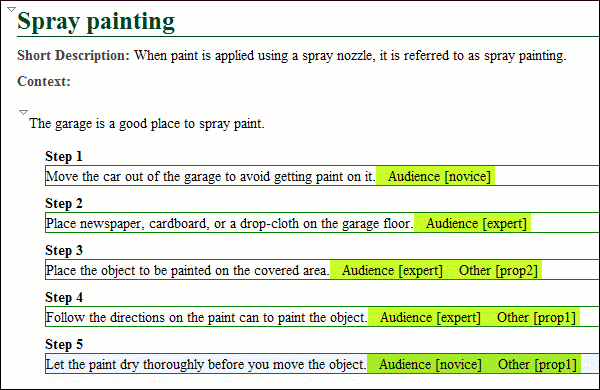
Suppose that you have the following document:
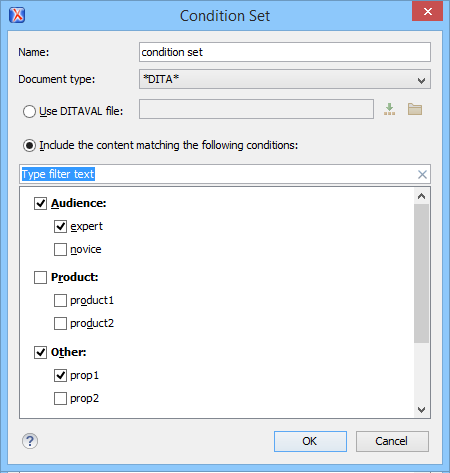
If you apply the following condition set, it means that you want to filter out the content to only include content written for an expert audience and content that has the Other attribute value of prop1.
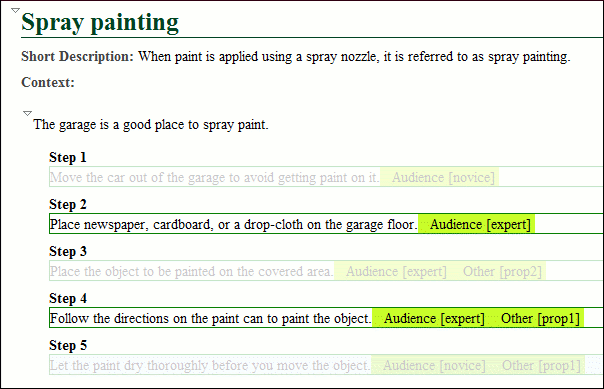
This is how the document looks after you apply the condition set: