
MetadataEdit online
DITA has a solid vocabulary for specifying metadata. There are
<prolog> elements in the topics, and
<topicmeta>, <bookmeta> elements in the
bookmaps. They can be used to define authors, dates, audiences, organizations, etc. See: https://www.oxygenxml.com/dita/1.3/specs/archSpec/base/metadata-in-maps-and-topics.html
It is up to you to decide where this information should be presented, in the PDF content or in the PDF document properties.
Metadata - Input XML fragmentEdit online
In the merged map, the metadata section is placed inside the
<oxy:front-page> element. This is different from the original
placement in the map or bookmap - after the title, but allows usage of information from it in
the title page.
Bookmaps
This is an example of a section taken from a merged bookmap. It only contains some of the
possible metadata elements. The bookmeta metadata section is inherited from
topicmeta:
<bookmap xmlns:ditaarch="http://dita.oasis-open.org/architecture/2005/"
  xmlns:opentopic-index="http://www.idiominc.com/opentopic/index" cascade="merge"
    class="- map/map bookmap/bookmap "
  ditaarch:DITAArchVersion="1.3" >

  <oxy:front-page xmlns:oxy="http://www.oxygenxml.com/extensions/author">

   <bookmeta xmlns:dita-ot="http://dita-ot.sourceforge.net/ns/201007/dita-ot"
     class="- map/topicmeta bookmap/bookmeta ">
     <author class="- topic/author ">Howe Tuduit</author>
     <bookid class="- topic/data bookmap/bookid ">
       <isbn class="- topic/data bookmap/isbn ">071271271X</isbn>
       <booknumber class="- topic/data bookmap/booknumber ">SG99-9999-00</booknumber>
        <maintainer class="- topic/data bookmap/maintainer ">
        <organization class="- topic/data bookmap/organization ">ACME Tools</organization>
        <person class="- topic/data bookmap/person "/>
       </maintainer>
     </bookid>
     <bookrights class="- topic/data bookmap/bookrights ">
        ...
         <bookowner class="- topic/data bookmap/bookowner ">
  <organization class="- topic/data bookmap/organization ">ACME Tools, Inc.</organization>
         </bookowner>
     </bookrights>
        </bookmeta>

        <oxy:front-page-title>
            ...
...
For the DITA Map PDF - based on HTML5 &
CSS transformation type, the merged map is further processed
resulting in a collection of HTML5 <div> elements. These
elements preserve the original DITA @class attribute values and
add a new value derived from the DITA element name.
<div
    class="- map/map bookmap/bookmap bookmap" ... >

   <div class=" front-page/front-page front-page">

   <div
     class="- map/topicmeta bookmap/bookmeta boometa">
     <div class="- topic/author author">Howe Tuduit</div>
     <div class="- topic/data bookmap/bookid bookid">
       <div class="- topic/data bookmap/isbn isbn">071271271X</div>
       <div class="- topic/data bookmap/booknumber booknumber">SG99-9999-00</div>
       <div class="- topic/data bookmap/maintainer maintainer">
          <div class="- topic/data bookmap/organization organization">ACME Tools</div>
          <div class="- topic/data bookmap/person person"/>
        </div>
      </div>
      <div class="- topic/data bookmap/bookrights bookrights">
        ...
         <div class="- topic/data bookmap/bookowner bookowner">
              <div class="- topic/data bookmap/organization organization">
                                          ACME Tools, Inc.
              </div>
         </div>
       </div>
     </div>

     <div class=" front-page/front-page-title front-page-title">
            ...
...
Maps
The maps have a more simple structure, they use the <topicmeta>
element for metadata sections. This is also a simplified example, as there may be many more
elements in the metadata section:
<map xmlns:ditaarch="http://dita.oasis-open.org/architecture/2005/"
    xmlns:opentopic-index="http://www.idiominc.com/opentopic/index"
          cascade="merge" class="- map/map "
    ditaarch:DITAArchVersion="1.3">
    ...

<oxy:front-page xmlns:oxy="http://www.oxygenxml.com/extensions/author">

  <topicmeta class="- map/topicmeta ">
      <author class="- topic/author ">Dan C</author>
      <metadata class="- topic/metadata ">
         <prodinfo class="- topic/prodinfo ">
             <prodname class="- topic/prodname ">oXygen PDF CSS DITA Plugin</prodname>
         </prodinfo>
      </metadata>
      <audience class="- topic/audience "/>
  </topicmeta>
...
For the DITA Map PDF - based on HTML5 & CSS transformation
type, the merged map is further processed resulting in a collection of HTML5
<div> elements:
<div xmlns:ditaarch="http://dita.oasis-open.org/architecture/2005/"
    xmlns:opentopic-index="http://www.idiominc.com/opentopic/index"
          cascade="merge" class="- map/map "
    ditaarch:DITAArchVersion="1.3">
    ...

<div class=" front-page/front-page front-page">

  <div class="- map/topicmeta topicmeta">
      <div class="- topic/author author">Dan C</div>
      <div class="- topic/metadata metadata">
         <div class="- topic/prodinfo prodinfo">
             <div class="- topic/prodname prodname">oXygen PDF CSS DITA Plugin</div>
         </div>
      </div>
      <div class="- topic/audience audience"/>
  </topicmeta>
...
Metadata - Built-in CSS rulesEdit online
The [PLUGIN_DIR]/css/print/p-meta.css file contains the rules that extract metadata.
How to Add the Publication Audience to the Custom PDF MetadataEdit online
<topicmeta> element in a <map> as in
the following
example:<map>
...
<topicmeta>
...
<audience type="programmer" job="programming" experiencelevel="expert"/>To collect the @type attribute, add the following in your customization CSS:
*[class ~= "map/map"] > *[class ~= "map/topicmeta"] > *[class ~= "topic/audience"] {
    -oxy-pdf-meta-custom: "Audience" attr(type);
}
*[class ~=
      "map/topicmeta"]
) instead of topicmeta to cover cases where the
elements are specialized (for instance, in a bookmap the bookmeta is a
topicmeta, so your selector will also function for bookmaps, not only
simple maps. map > to choose the
<topicmeta> that is a direct child of the map, not other
<topicmeta> elements from other <topicref>
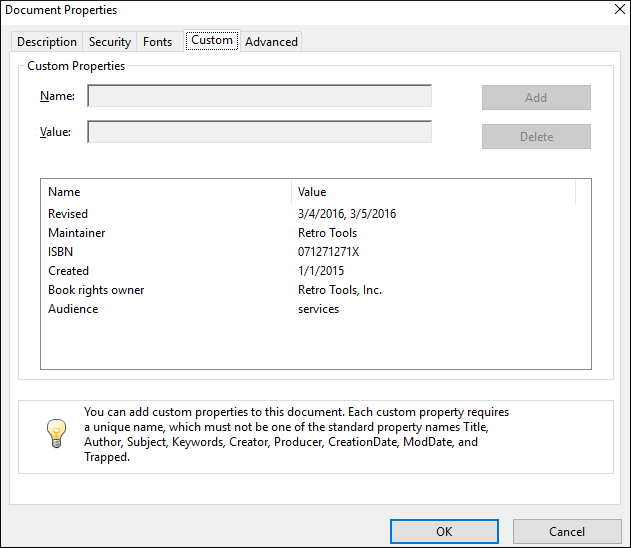
elements.The metadata is displayed in the Custom tab of the Document Properties dialog box from Acrobat Reader:
How to Show Metadata in the Cover PageEdit online
<bookmap id="taskbook">
    <booktitle>
        <booklibrary>Retro Tools</booklibrary>
        <mainbooktitle>Product tasks</mainbooktitle>
        <booktitlealt>Tasks and what they can do</booktitlealt>
    </booktitle>
    <bookmeta>
        <author>Howe Tuduit</author>
        <critdates>
            <created date="1/1/2015"/>
            <revised modified="3/4/2016"/>
            <revised modified="3/5/2016"/>
        </critdates>
        <bookid>
            <isbn>071271271X</isbn>
            <booknumber>SG99-9999-00</booknumber>
...
The entire <booktitle> element content is displayed on the first page
of the PDF, so suppose you need to add the information after it.
*[class ~= "bookmap/booktitle"]:after {
    display:block;
    content: "by " oxy_xpath('//*[contains(@class, " bookmap/bookmeta ")]/*[contains(@class, " topic/author ")]/text()');
    margin-top: 4em;
    text-align: center;
    color: gray;
}
*[class ~= "bookmap/booktitle"]:after(2) {
    display:block;
    content: "ISBN "oxy_xpath('//*[contains(@class, " bookmap/isbn ")]/text()');
    text-align: center;
    color: gray;
}
- oxy_xpath - Executes an XPath expression and returns a string content. Use this whenever you need to extract data from elements other than the one matched by the CSS rule selector.
:after(N)- Creates more than one after pseudo element. The argument value represents how far the generated content is from the real content. In the example above, the content of the:afteris closer to the title (upper) than the content of the:after(2).
attr() CSS function can also be used but is limited to
extracting attribute values from the matched element.Generating Synthetic Pages for Metadata.
Suppose you need to show this information on a page that follows the title page, instead of on the title page. In this case, you need to prepare a named page and place the content on it. In your customization CSS, add the following CSS rules:
@page page-for-meta {
    background-color: yellow; /* Just to see it better*/
    @top-left-corner {
        content:""; /* Remove the default header */
    }
    @top-right-corner {
        content:""; /* Remove the default header */
    }
}

*[class ~= "bookmap/booktitle"]:after {
    page: page-for-meta;
}
*[class ~= "bookmap/booktitle"]:after(2) {
    page: page-for-meta;
}
How to Show Metadata in the Header or Footer Edit online
The header and footer are composed of page margin boxes that can be populated with static text by using string-sets.
*[class ~= "front-page/front-page"] >
  *[class ~= "map/topicmeta"] >
    *[class ~= "topic/critdates"] >
      *[class ~= "topic/created"]{
    string-set: mapcreated attr(date);
}


@page front-page {
     @top-center {
          content: "Created: " string(mapcreated);
     }
}