
IndexEdit online
The index section collects all the index terms from the publication and shows them in a sorted tree.
Index - Input XML fragmentEdit online
In the merged DITA map, the structure that holds the index tree is the
<opentopic-index:index.groups> element.
<map class="- map/map " >
    <oxy:front-page>
        ...
    </oxy:front-page>
    <opentopic:map xmlns:opentopic="http://www.idiominc.com/opentopic">
        ...
    </opentopic:map>
    <topic class="- topic/topic ">
        <title class="- topic/title ">Request Support</title>
       ...
    </topic>
    <opentopic-index:index.groups id="d16e5548">
      ...
    </opentopic-index:index.groups>
</map>
- A label, the starting letter ("T" in the following example).
- A tree of
<opentopic-index:index.entry>elements.
<opentopic-index:index.group>

 <opentopic-index:label>T</opentopic-index:label>

  <opentopic-index:index.entry value="table of contents">
    <opentopic-index:formatted-value>table of contents</opentopic-index:formatted-value>
    <opentopic-index:refID value="table of contents:">
        <oxy:index-link xmlns:oxy="http://www.oxygenxml.com/extensions/author"
               href="#d16e3988"> [d16e3988]
        </oxy:index-link>
    </opentopic-index:refID>
    <opentopic-index:index.entry value="change header">
        <opentopic-index:formatted-value>change header</opentopic-index:formatted-value>
        <opentopic-index:refID value="table of contents:change header:">
           <oxy:index-link xmlns:oxy="http://www.oxygenxml.com/extensions/author"
                href="#d16e4176">
                [d16e4176] </oxy:index-link>
        </opentopic-index:refID>
    </opentopic-index:index.entry>
    <opentopic-index:index.entry value="style">
        <opentopic-index:formatted-value>style</opentopic-index:formatted-value>
        <opentopic-index:refID value="table of contents:style:">
            <oxy:index-link xmlns:oxy="http://www.oxygenxml.com/extensions/author"
                href="#d16e4120">
                [d16e4120] </oxy:index-link>
        </opentopic-index:refID>
  </opentopic-index:index.entry>
 </opentopic-index:index.entry>
</opentopic-index:index.group>
- The formatted value (
<opentopic-index:formatted-value>). - A link to the publication content
(
<opentopic-index:refID>/<oxy:index-link>). - Possibly other child entries.
For the DITA Map PDF - based on HTML5 &
CSS transformation type, the merged map is further processed
resulting in a collection of HTML5 <div> elements. These
elements preserve the original DITA @class attribute values and
add a new value derived from the DITA element name.
 <div class="- map/map map" >
    <div class="front-page/front-page">
        ...
    </div>
    <div class="toc/toc toc">
        ...
    </div>
    <div class="- topic/topic topic">
        <div class="- topic/title title">Request Support</title>
       ...
    </div>
    <div class=" index/groups groups">
      ...
    </div>
</map>
The index group content becomes:
<div class=" index/group group">
  <div class=" index/label label">T</div>

  <div class=" index/entry entry">
    <div class=" index/formatted-value formatted-value">table of contents</div>
    <div class=" index/refid refid">
        <div class=" index/link link"
               href="#d16e3988"> [d16e3988]
        </div>
    </div>
    <div class=" index/entry entry">
        <div class=" index/formatted-value formatted-value">change header</div>
         <div class=" index/refid refid">
             <div class=" index/link link"
                href="#d16e4176"> [d16e4176] </div>
        </div>
    </div>
    <div class=" index/entry entry">
        <div class=" index/formatted-value formatted-value">style</div>
        <div class=" index/refid refid">
            <div class=" index/link link"
                href="#d16e4120"> [d16e4120] </div>
        </div>
    </div>
  </div>
</div>
Index - Built-in CSSEdit online
All index styling is found in: [PLUGIN_DIR]css/print/p-index.css.
How to Style the Index Page Title and the Grouping LettersEdit online
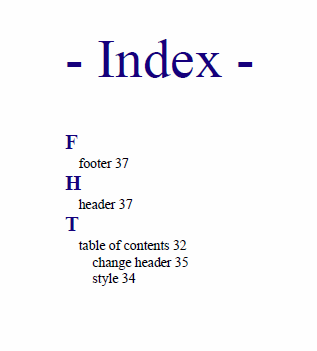
In your customization CSS, add the following CSS rules:
*[class ~= "index/groups"] *[class ~= "index/group"] *[class ~= "index/label"] {
    font-size:1.5em;
    color:navy;
}

*[class ~= "index/groups"]:before {
    content: "- Index - ";
    color:navy;
    font-size: 4em;
}
How to Style the Index Terms LabelsEdit online
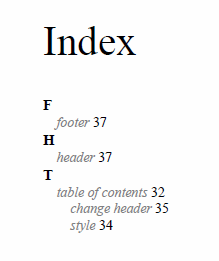
In your customization CSS, add the following CSS rule:
*[class ~= 'index/groups'] *[class ~= 'index/formatted-value'] {
    font-style:oblique;
    color:gray;
}
How to Add Filling Dots Between the Index Labels and the Page NumbersEdit online
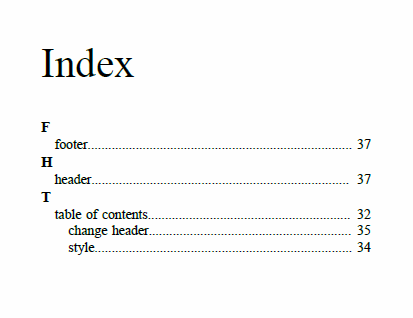
Suppose you want the leader CSS content to generate a row of dots. It is necessary that the parent entry have the text justified.
In your customization CSS, add the following CSS rule:
index\.entry {
    text-align:justify;
}
index\.entry  formatted-value:after {
    content:leader('.');
}
The output now contains the dots:
How to Change the Index Page Number Format and Reset its Value Edit online
The page number is reset at the beginning of the index page by the built-in CSS rule:
*[class ~= "index/groups"] {
        counter-reset: page 1;
}
If you want to start the page counter from a different initial number, just change the value of this counter. For example, to continue the normal page counting, use:
*[class ~= "index/groups"] {
        counter-reset: none;
}
If you need to style the page number differently (for example, using decimals), add the following CSS rule in your customization CSS:
@page index {
        @bottom-center      {          content: counter(page, decimal) }
}