In this example, we start adding functionality for inserting images in the Simple
Documentation Framework. The images are represented by the image
element. The location of the image file is represented by the value of the
href attribute. In the Java implementation, a dialog box will be
displayed with a text field, in which the user can enter a full URL or browse for a local
file.
Setup a sample project following this set of instructions. The framework project is
oxygen-sample-framework.
Modify the simple.documentation.framework.InsertImageOperation class
that implements the ro.sync.ecss.extensions.api.AuthorOperation interface. This
interface defines three methods: doOperation,
getArguments and getDescription
A short description of these methods follows:
The doOperation method is invoked when the action is performed
either by pressing the toolbar button, by selecting the menu item or by pressing the
shortcut key. The arguments taken by this methods can be one of the following
combinations:
The getArguments method is used by Oxygen XML Editor when the
action is configured. It returns the list of arguments (name and type) that are
accepted by the operation.
The getDescription method is used by Oxygen XML Editor when the
operation is configured. It returns a description of the operation.
Here is the implementation of these three methods:
/**
* Performs the operation.
*/publicvoid doOperation(
AuthorAccess authorAccess,
ArgumentsMap arguments)
throws IllegalArgumentException,
AuthorOperationException {
JFrame oxygenFrame = (JFrame) authorAccess.getWorkspaceAccess().getParentFrame()
;
String href = displayURLDialog(oxygenFrame);
if (href.length() != 0) {
// Creates the image XML fragment.
String imageFragment =
"<image xmlns='http://www.oxygenxml.com/sample/documentation' href='"
+ href + "'/>";
// Inserts this fragment at the cursor position.int caretPosition = authorAccess.getEditorAccess().getCaretOffset();
authorAccess.getDocumentController().insertXMLFragment
(imageFragment, caretPosition);
}
}
/**
* Has no arguments.
*
* @return null.
*/public ArgumentDescriptor[] getArguments() {
return null;
}
/**
* @return A description of the operation.
*/public String getDescription() {
return"Inserts an image element. Asks the user for a URL reference.";
}
Note: The complete source code for the examples can be found in the Simple
Documentation Framework project, included in the oxygen-sample-framework module of the
Oxygen SDK , available as a Maven archetype on the Oxygen XML Editor website.
Important:
Make sure you always specify the namespace of the inserted fragments.
Package the compiled class into a jar file. An example of an Ant script that packages
the classes folder content into a jar archive named
sdf.jar is listed below:
Select the Classpath tab in the lower part of the Document Type configuration dialog box and press the Add button . In the
displayed dialog box, enter the location of the jar file, relative to the Oxygen XML Editorframeworks folder.
We now create the action that will use the defined operation. Go to the
Actions subtab. Copy the icon files for the menu item and for the
toolbar in the frameworks/sdf folder.
Define the action's properties:
Set ID to insert_image.
Set Name to Insert image.
Set Menu access key to letter i.
Set Toolbar action to ${framework}/toolbarImage.png.
Set Menu icon to ${framework}/menuImage.png.
Set Shortcut key to Ctrl (Meta on Mac OS)+Shift+i.
Next, we set up the operation. You want to add images only if the current element is a
section, book or article.
Set the value of XPath expression to
local-name()='section' or local-name()='book'
 or local-name()='article'
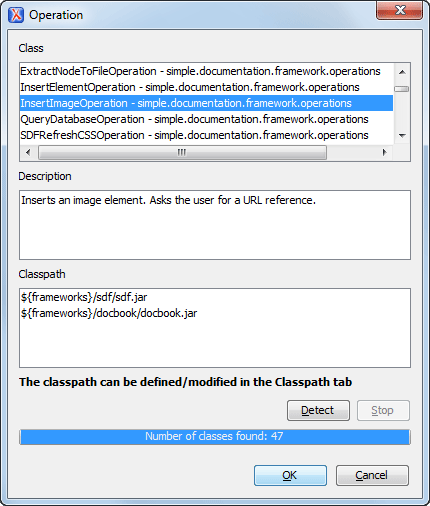
Set the Invoke operation field to
simple.documentation.framework.InsertImageOperation.
Figure: Selecting the Operation
Add the action to the toolbar, using the Toolbar panel.
To test the action, you can open the sdf_sample.xml sample, then place the cursor
inside a section between two para elements (for
instance). Press the button associated with the action from the toolbar. In the dialog box,
select an image URL and press OK. The image is inserted into the
document.
 Add button . In the
displayed dialog box, enter the location of the jar file, relative to the Oxygen XML Editor
frameworks folder.
Add button . In the
displayed dialog box, enter the location of the jar file, relative to the Oxygen XML Editor
frameworks folder.