Customizing the Main CSS of a Document TypeHistory | Edit
The easiest way to customize the main CSS stylesheet of a document type is to create a new CSS stylesheet, save it as an alternate CSS file that will be applied as an additional layer to the main CSS, and then select it from the Styles drop-down menu in Author mode.
For example, suppose that you want to customize the main CSS for DITA documents. To do this, follow these steps:
-
Edit the DITA framework and go to its CSS subtab:
- Open the Preferences dialog box and go to Document Type Association.
- Select the DITA document type and press the Edit button.
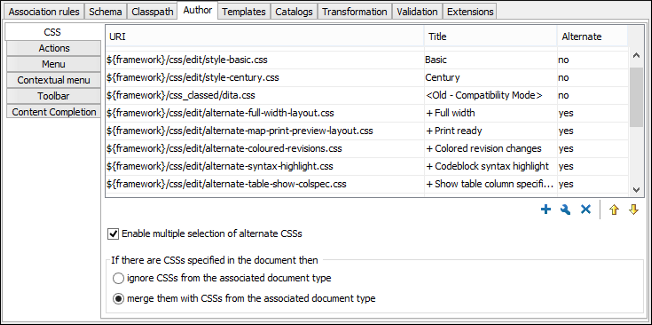
Tip: If you do not have write permissions to modify the document type, use the Extend button to create an extension of the framework.- Go to the CSS subtab of the Author tab.
Figure: CSS Subtab of the Document Type Association Author Tab
-
Add the new stylesheet as an alternate CSS stylesheet:
-
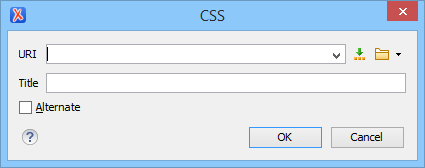
Click the
 Add button to open a dialog box that allows you to specify the URI and
Title for your newly created stylesheet.
Add button to open a dialog box that allows you to specify the URI and
Title for your newly created stylesheet.
- Check the Alternate option to define it as an alternate stylesheet that will applied as an additional layer to the main CSS.
Figure: Add CSS Stylesheet Dialog Box
-
Click the
-
Select your newly created CSS stylesheet from the Styles
drop-down menu on the toolbar in Author mode.
You can now edit DITA documents based on the new CSS stylesheet. You can also edit the new CSS stylesheet itself and see its effects on rendering DITA documents in the Author mode by using the
 Refresh action that is
available on the Author toolbar and in the
DITA menu.
Refresh action that is
available on the Author toolbar and in the
DITA menu.