Component Dependencies View in WSDL DocumentsHistory | Edit
The Component Dependencies view allows you to view the dependencies for a selected WSDL component. If the view is not displayed, it can be opened from the menu.
To view the dependencies of an WSDL component, select the desired component in the editor and
choose the Component Dependencies action from the contextual menu. This action is
available for all WSDL components (
messages, port types,
operations, bindings and so on).Note: If you search for
dependencies of XML Schema elements, the Component Dependencies view
presents the references from WSDL documents.
Figure: Component Dependencies View
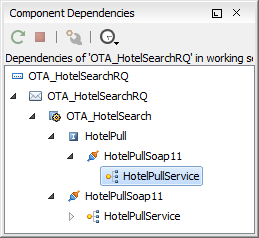
The following action are available in the toolbar of the Component
Dependencies view:
 Refresh
- Refreshes the dependencies structure.
 Stop
Stop- Stops the dependencies computing.
 Configure
- Allows you to configure a search scope to compute the dependencies structure. You can decide to use the defined scope for future operations automatically, by checking the corresponding check box.
 History
- Allows you to repeat a previous dependencies computation.
The following actions are available in the contextual menu of the Component
Dependencies view:
- Go to First Reference
- Selects the first reference of the referenced component from the current selected component in the dependencies tree.
- Go to Component
- Displays the definition of the current selected component in the dependencies tree.
Tip: If a component contains multiple references to another, a small table is
displayed that contains all references. When a recursive reference is encountered, it is
marked with a special icon  .
.
.