XSLT Quick Assist SupportHistory | Edit
The Quick Assist support helps you to rapidly access search and refactoring
actions. If one or more actions are available in the current context, they are accessible via
a yellow bulb help ( ) placed at the current line in
the stripe on the left side of the editor. Also, you can invoke the quick assist menu by using
the Alt + 1
(Meta + Alt +
1 on Mac OS X) keyboard shortcuts.
) placed at the current line in
the stripe on the left side of the editor. Also, you can invoke the quick assist menu by using
the Alt + 1
(Meta + Alt +
1 on Mac OS X) keyboard shortcuts.
Two categories of actions are available in the Quick Assist menu:
- Actions available on a selection made inside an attribute that contains an XPath expression:
 Extract template
- Extracts the selected XSLT instructions sequence into a new template.
 Move to another stylesheet
- Allows you to move one or more XSLT global components (templates, functions, or parameters) to another stylesheet.
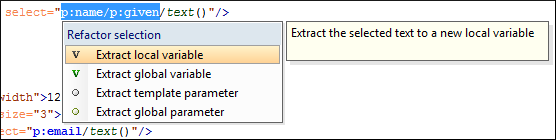
 Extract local
variable
Extract local
variable- Allows you to create a new local variable by extracting the selected XPath expression.
 Extract global
variable
Extract global
variable- Allows you to create a new global variable by extracting the selected XPath expression.
 Extract template
parameter
Extract template
parameter- Allows you to create a new template parameter by extracting the selected XPath expression.
 Extract global
parameter
Extract global
parameter- Allows you to create a new global parameter by extracting the selected XPath expression.
Figure: XSLT Quick Assist Support - Refactoring Actions
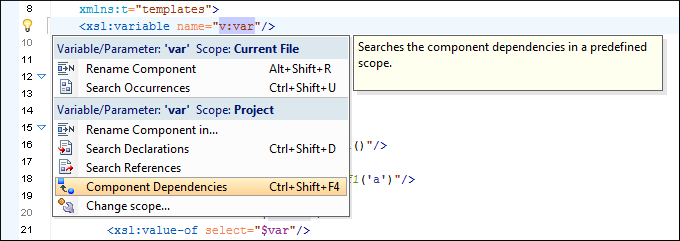
- Actions available when the cursor is positioned over the name of a component:
 Rename Component
in
Rename Component
in- Renames the component and all its dependencies.
 Search
Declarations
Search
Declarations- Searches the declaration of the component in a predefined scope. It is available only when the context represents a component name reference.
 Search
References
Search
References- Searches all references of the component in a predefined scope.
 Component
Dependencies
Component
Dependencies- Searches the component dependencies in a predefined scope.
 Change
Scope
Change
Scope- Configures the scope that will be used for future search or refactor operations.
- Rename
Component
- Allows you to rename the current component in-place.
 Search
Occurrences
Search
Occurrences- Searches all occurrences of the component within the current file.
Figure: XSLT Quick Assist Support - Component Actions