Configure
Content Completion for a FrameworkEdit online
You can customize the content of the following Author controls,
adding items (which, when invoked, perform custom actions) or filtering the default
contributed ones:
- Content Completion Assistant window
- Elements view
- Insert Element menus (from the Outline view or breadcrumb contextual menus)
You can use the content completion customization support in a custom framework by following this procedure:
-
Open the Document type configuration dialog box for your custom
framework and select the Author tab. Next, go to the
Content Completion tab.
Figure: Customize Content Completion 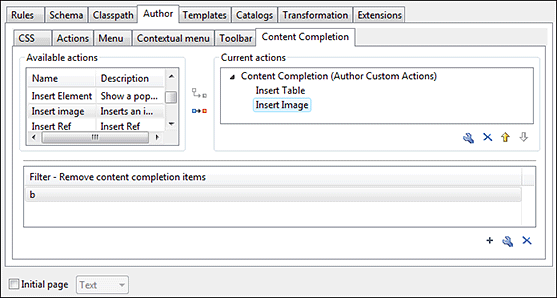
The top side of the Content Completion section contains the list with all the actions defined within the custom framework and the list of actions that you decided to include in the Content Completion Assistant list of proposals. The bottom side contains the list with all the items that you decided to remove from the Content Completion Assistant list of proposals.
-
If you want to add a custom action to the list of current Content
Completion proposals, select the action item from the Available
actions list and press the
 Add as child or
  Add as sibling button to include it in the
Current actions list. An Insert Action
dialog box appears, giving you the possibility to select where to provide the selected
action.
Add as sibling button to include it in the
Current actions list. An Insert Action
dialog box appears, giving you the possibility to select where to provide the selected
action.
Figure: Insert Action Dialog Box 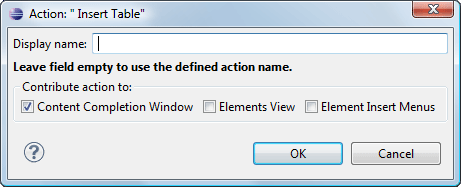
-
If you want to exclude a certain item from the Content
Completion proposals, you can use the
 Add button from the
Filter - Remove content completion items list. The
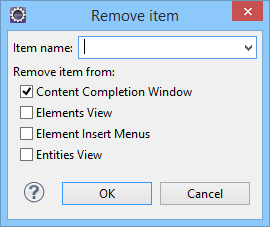
Remove item dialog box is displayed, allowing you to input the
item name and to choose the controls that filter it. The Item name
combo box accepts wildcards.
Add button from the
Filter - Remove content completion items list. The
Remove item dialog box is displayed, allowing you to input the
item name and to choose the controls that filter it. The Item name
combo box accepts wildcards.
Figure: Remove Item Dialog Box