
Document Type Configuration Dialog BoxEdit online
The Document Type Configuration dialog box allows you to create or edit a framework (document type). It is displayed when you use the New, Edit, Duplicate, or Extend buttons in the Document Type Association preferences page (open the Preferences dialog box and go to Document Type Association).
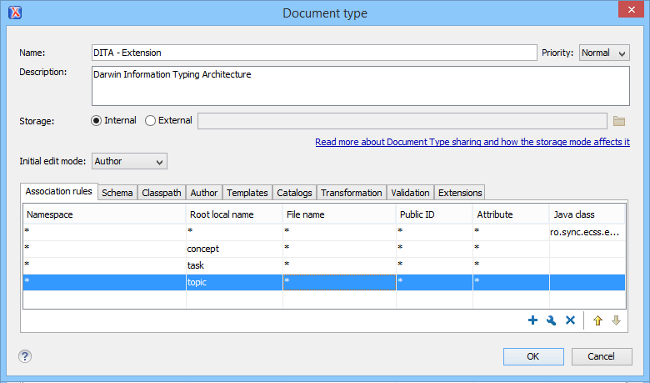
The configuration dialog box includes the following fields and sections:
- Name
- The name of the framework. This will be displayed as its name in the Document Type column in the Document Type Association preferences page.
- Priority
- Depending on the priority level, Oxygen XML Editor plugin establishes the order in which
the existing frameworks are evaluated to determine the type of a document
you are opening. It can be one of the following: Lowest,
Low, Normal, High, or
Highest. You can set a higher priority for frameworks
you want to be evaluated first.Note: The built-in document types are set to Low priority by default. Frameworks that have the same priority are sorted alphabetically.
- Description
- The document type description displayed as a tool tip in the Document Type Association preferences page.
- Storage
- The location where the document type is saved. If you select the
External storage option, the document type is saved in the
specified file with a mandatory
frameworkextension, located in a subdirectory of the current frameworks directory. If you select the Internal storage option, the document type data is saved in the Oxygen XML Editor plugin internal options file. - Initial edit mode
- Sets the default edit mode when you open a document for the first time:
Editor specific, Text, Author,
Grid and Design
(available only for the W3C XML Schema editor). If the Editor
specific option is selected, the initial editing mode is determined based
upon the editor type. You can find the mapping between editors and edit modes in the
Edit modes preferences
page. You can impose an initial mode for opening files that match the
association rules of the document type. For example, if the files are usually edited in
the Author mode you can set it in the Initial edit
mode combo box.Note: You can also customize the initial mode for a document type in the Edit modes preferences page. Open the Preferences dialog box and go to .
- Configuration Tabs
- The bottom section of the dialog box includes various tabs where you can configure numerous options for the framework.