
Visual Hints for the Cursor PositionEdit online
When the cursor is positioned inside a new context, a tooltip will be shown for a couple of seconds displaying the position of the cursor relative to the context of the current element.
Here are some of the common situations that can be encountered:
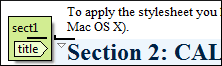
- Before first block - The cursor is positioned before the first block child of the current
node.
- Between two block elements - The cursor is positioned between two
block elements.
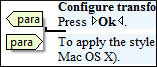
- After last block - The cursor is positioned after the last block element child of the current
node.
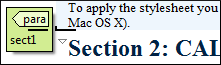
- Inside a node - The cursor is positioned inside a node.

- Before an inline element - The cursor is positioned inside an element,
before a child inline
element.
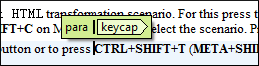
- Between two inline elements - The cursor is positioned between two inline elements.
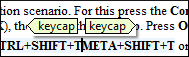
- After an inline element - The cursor is positioned inside an element, after an
child inline element.
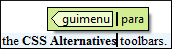
The nodes in these cases are displayed in the tooltip window using the element names.
To deactivate this feature, open the Preferences dialog box , go to , and deselect the Show cursor position tooltip option. Even if this option is deselected, you can still display the position tooltip by pressing Shift+F2.
 Tags display
mode drop-down menu.
Tags display
mode drop-down menu.Location Tooltip
When editing XML documents in a visual environment, you might find it difficult to position the cursor between certain tags that do not have a visual representation. To counterbalance this, Oxygen XML Editor plugin displays a transparent preview of the position information, called the Location Tooltip:
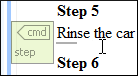
- You are editing the document in one of the following tags display modes: Inline Tags, Partial Tags, No Tags.
- The mouse pointer is moved between block elements.
To activate or deactivate this feature, use the Show location tooltip on mouse move option in the Cursor Navigation preferences page.