DITA Reusable Components View
The DITA Reusable Components view is helpful if you use a large amount of keys in your DITA project. It collects all of the keys that are defined in the root map and presents them in a dynamic table where you can easily locate and insert references to them as cross reference links or variables. It includes a search filter field to help you find particular keys and some contextual menu actions. It also supports drag and drop actions and double-clicking a key is the fastest way to insert a key reference.
If the view is not displayed, it can be opened by selecting it from the menu. It will appear in the bottom-right section of the editor. It re-collects the keys anytime the root map is changed or you switch the editor focus to a different file.
Figure: DITA Reusable Components View
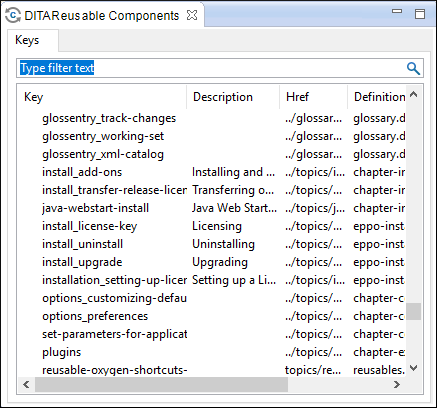
The DITA Reusable Components view includes the following features and options:
- Double-Click Mechanism
- You can double-click any key listed in the view to insert a key reference at the
current cursor position or surrounding the current selection. If the key points to an
hrefvalue, it will be inserted as a cross reference link (xref). If the key does not have an associatedhref, it will be inserted as a variable reference (ph). - Drag and Drop Mechanism
- You can drag a key from the view and drop it in the main editor to insert a key
reference at the current cursor position. If the key points to an
hrefvalue, it will be inserted as a cross reference link (xref). If the key does not have an associatedhref, it will be inserted as a variable reference (ph). - Search Filter
- You can enter text in the filter field at the top of the view to filter the list and search for a specific keys.
- Columns
- The view includes the following columns:
- Key - The name of the key.
- Description - The description of the key that
is obtained from the definition of the key (for example, the
description for a keydef would be found in the
keywordelement inside topicmeta, or the description for a topicref would be found in anavitleelement). For more information about where the data in this column is collected, see this note. - Href - The value of the href where the key points to.
- Definition Location - The name of the DITA map where the key is defined.
Note: The Description column collects data from the definition of the key, either from thenavtitleelement or, if missing, from thekeywordelement. The following example shows two key definitions that will be collected in the keys table. Their corresponding information from the Description column will displayoxygen.shandoxygen.tar.gzrespectively.<keydef keys="executableInstallLinux"> <topicmeta> <keywords> <keyword>oxygen.sh</keyword> </keywords> </topicmeta> </keydef> <keydef keys="archiveInstallAll"> <topicmeta> <navtitle> oxygen.tar.gz </navtitle> </topicmeta> </keydef>
- Contextual Menu Actions
-
- Insert as Link
- Inserts a cross reference link (xref) to the selected key at the current cursor position or surrounding the current selection.
- Insert as Variable
- Inserts a variable reference (ph) to the selected key at the current cursor position or surrounding the current selection.
- Insert as Keyref
- Presents a submenu with all the elements that can be inserted at the current
cursor position. Selecting an element will insert that element at the current
cursor position or surrounding the current selection with a
keyrefattribute and its value set to the selected key. - Show Definition
- Opens the DITA map where the key is defined.
- Group by Definition Location
- A toggle action that can be used to group (and sort) all the keys based upon the value in the Definition Location column.