Compiling an XSL Stylesheet for Saxon
As of Saxon 9.7, it is possible to export a compiled form of a stylesheet as an XML file
(called a stylesheet export file). Oxygen XML Editor plugin includes a simple tool
called Compile XSL Stylesheet for Saxon that does this for you. A
stylesheet export file is also needed if you want to use the Saxon-JS product
to run transformations in a browser, as in the following
example:
<script type="text/javascript" src="SaxonJS/SaxonJS.min.js"></script>
<script>
    window.onload = function() {
      SaxonJS.transform({
         stylesheetLocation: "books.sef",
         sourceLocation: "books.xml"
         });
    }
</script>
The Compile XSL Stylesheet for Saxon tool can be found in the
XML Tools menu and it compiles a
specified stylesheet as an XML file (stylesheet export file with a file extension of
.sef).
Selecting this tool opens the Compile XSL Stylesheet for Saxon dialog box that allows you to configure some options for conversion.
Figure: Compile XSL Stylesheet for Saxon Dialog Box
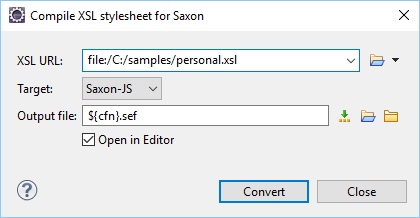
This dialog box includes the following options:
- XSL URL
- Allows you to select URL of the source XSL stylesheet. You can specify the URL by
using the text field, the history drop-down, or the browsing tools in the
 Browse drop-down list.
 - Target
- Allows you to select the type of Saxon product that the export file will be used with. You can choose Saxon-JS, Saxon-EE, Saxon-PE, or Saxon-HE.
- Output file
- You can specify the path where the output file will be saved by entering it in the
text field, using the
 Insert Editor Variables button, or using the

 browsing tool buttons.
 - Convert
- Use this button to generate the stylesheet export file according the options selected in this dialog box.