
XML Schema Outline ViewEdit online
The Outline view for XML Schemas presents all the global components grouped by their location, namespace, or type. By default, it is displayed on the left side of the editor. If the view is not displayed, it can be opened by selecting it from the menu.
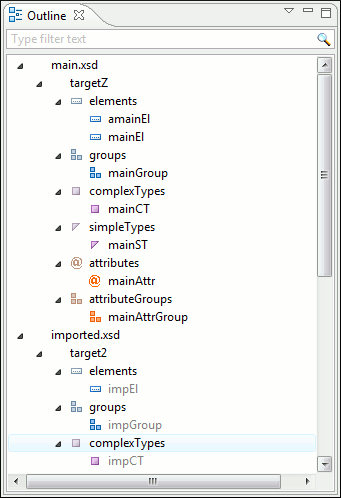
The Outline view provides the following options in the View Menu on the Outline view action bar:
- Filter returns exact matches
- The text filter of the Outline view returns only exact matches;
 Selection
update on cursor move
Selection
update on cursor move- Allows a synchronization between Outline view and schema diagram. The selected view from the diagram is also selected in the Outline view.
 Sort
Sort- Allows you to sort alphabetically the schema components.
- Show all components
- Displays all components that were collected starting from the master files. Components that are
not referable from the current file are marked with an orange underline. To reference
them, add an import directive with the
componentNSnamespace. - Show referable components
- Displays all components (collected starting from the master files) that can be referenced from the current file. This option is set by default.
- Show only local components
- Displays the components defined in the current file only.
- Group by location/namespace/type
- These three operations allow you to group the components by location, namespace, or type. When grouping by namespace, the main schema target namespace is the first presented in the Outline view.
The following contextual menu actions are available in the Outline view:
- Remove (Delete)
- Removes the selected item from the diagram.
 Search
References
Search
References - Searches all references of the item found at current cursor position in the defined scope, if any.
- Search References in
- Searches all references of the item found at current cursor position in the specified scope.
 Component Dependencies
 - Opens the Component Dependencies view that allows you to see the dependencies for the current selected component.
- Resource Hierarchy
- Opens the Resource Hierarchy / Dependencies view that allows you to see the hierarchy for the current selected resource.
- Resource Dependencies
- Opens the Resource Hierarchy / Dependencies view that allows you to see the dependencies for the current selected resource.
 Rename
Component in
Rename
Component in- Renames the selected component.
 Generate Sample XML
Files
Generate Sample XML
Files- Generate XML files using the current opened schema. The selected component is the XML document root.
The upper part of the Outline view contains a filter box that allows you to focus on the relevant components. Type a text fragment in the filter box and only the components that match it are presented. For advanced usage you can use wildcard characters (*, ?) and separate multiple patterns with commas.
- * - any string
- ? - any character
- , - patterns separator
The content of the Outline view and the editing area are synchronized. When you select a component in the Outline view, its definition is highlighted in the editing area.