
Editing XProc ScriptsEdit online
XProc is an XML pipeline language that can be used to script transformations. An XProc script is edited as an XML document that is validated against a RELAX NG schema, or if the script has an associated transformation scenario, then the XProc engine selected in the scenario is used as the validating engine (if the XProc engine supports validation). The default engine for XProc scenarios is a version of the Calabash engine that comes bundled with Oxygen XML Editor plugin version 20.1.
XProc Content Completion
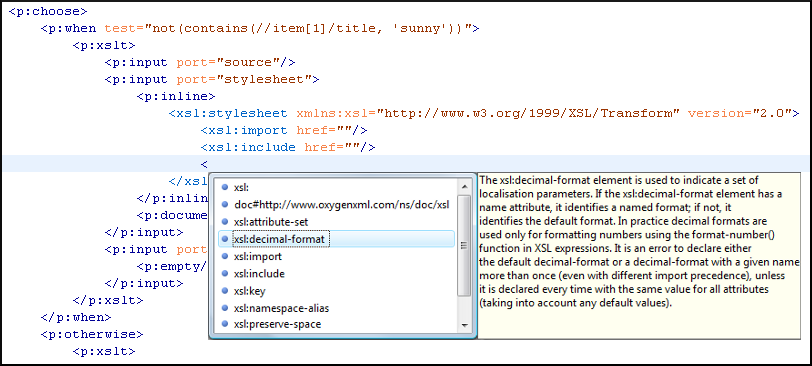
Oxygen XML Editor plugin helps you edit a XProc scripts through the Content Completion Assistant, offering proposals that are valid at the cursor position. It can be manually activated with the Ctrl + Space (Command + Space on OS X) shortcut.
The content completion inside the element input/inline from the XProc
namespace http://www.w3.org/ns/xproc offers elements from the following schemas
depending both on the port attribute and the parent of the
input element. When invoking the content completion inside the XProc
element inline, the list of content completion proposals is populated as
follows:
- If the value of the
portattribute isstylesheetand thexsltelement is the parent of theinputelements, the Content Completion Assistant offers XSLT elements. - If the value of the
portattribute isschemaand thevalidate-with-relax-ngelement is the parent of theinputelement, the Content Completion Assistant offers RELAX NG schema elements. - If the value of the
portattribute isschemaand thevalidate-with-xml-schemaelement is the parent of theinputelement, the Content Completion Assistant offers XML Schema schema elements. - If the value of the
portattribute isschemaand thevalidate-with-schematronelement is the parent of theinputelement , the Content Completion Assistant offers either ISO Schematron elements or Schematron 1.5 schema elements. - If the above cases do not apply, then the Content Completion Assistant offers elements from all the schemas from the above cases.
XProc Syntax Highlighting
The XProc editor assists you in writing XPath expressions by offering dedicated coloring schemes for syntax highlighting.
- Open the Preferences dialog box .
- Go to .
- Select and expand the XML section in the top pane.
- Select the component you want to change and customize the colors or styles using the selectors to the right of the pane.
- Select the XML tab in the Preview pane to see the effects of your changes.
Enabling Extensions in Calabash
If you are using the default Calabash engine, it is possible to configure extensions (for a list of the valid extensions, see http://xmlcalabash.com/docs/reference/cfg.extension.html).
- Edit the following file: OXYGEN_INSTALL_DIR/lib/xproc/calabash/engine.xml.
- Add the extension and its value as a
system-property, as in the following example:<system-property name="com.xmlcalabash.allow-text-results" value="true"/>