
JSON Outline ViewEdit online
The Outline view for JSON documents displays the list of all the components of the JSON document you are editing. By default, it is displayed on the left side of the editor. If the view is not displayed, it can be opened by selecting it from the menu.
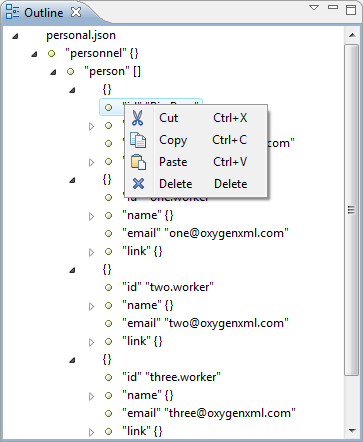
 Cut
Cut Copy
Copy Paste
Paste Delete
The View menu on the JSON
Outline view action bar includes a  Selection update on cursor
move option that allows you to control the synchronization between the
Outline view and source the document. Oxygen XML Editor plugin
synchronizes the selection in the Outline view with the cursor moves or
the changes you make in the JSON editor. Selecting one of the components from the
Outline view also selects the corresponding item in the source
document.
Selection update on cursor
move option that allows you to control the synchronization between the
Outline view and source the document. Oxygen XML Editor plugin
synchronizes the selection in the Outline view with the cursor moves or
the changes you make in the JSON editor. Selecting one of the components from the
Outline view also selects the corresponding item in the source
document.