
Custom Refactoring OperationsEdit online
While Oxygen XML Editor plugin includes a variety of built-in XML refactoring operations to help you accomplish particular tasks, you can also create custom operations according to your specific needs. For example, you could create a custom refactoring operation to convert an attribute to an element and insert the element as the first child of the parent element.
An XML Refactoring operation is defined as a pair of resources:
- An XQuery Update script or XSLT stylesheet that Oxygen XML Editor plugin will run to refactor the XML files.
- An XML Operation Descriptor file that contains information about the operation (such as the name, description, and parameters).
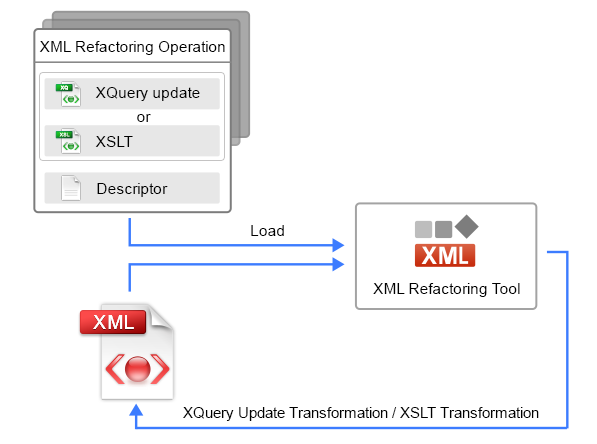
All the defined custom operations are loaded by the XML Refactoring Tool and presented in the Refactoring Operations wizard page, along with the built-in operations.
After the user chooses an operation and specifies its parameters, Oxygen XML Editor plugin
processes an XQuery Update or XSLT transformation over the input file. This transformation is
executed in a safe mode, which implies the following:
- When loading the document:
- The XInclude mechanism is disabled. This means that the resources included by using XInclude will not be visible in the transformation.
- The DTD entities will be processed without being expanded.
- The associated DTD will be not loaded, so the default attributes declared in the DTD will not be visible in the transformation.
- When saving the updated XML document:
- The
DOCTYPEwill be preserved.Note: This can be changed using Saxon extension functions in XSLT. - The DTD entities will be preserved as they are in the original document when the document is saved.
- The attribute values will be kept in their original form without being normalized.
- The spaces between attributes are preserved. Basically, the spaces are lost by a regular XML serialization since they are not considered important.
- The
The result of this transformation overrides the initial input file.
Note: To achieve some of
the previous goals, the XML Refactoring mechanism adds several attributes that are
interpreted internally. The attributes belong to the
http://www.oxygenxml.com/ns/xmlRefactoring/additional_attributes
namespace. These attributes should not be taken into account when processing the input XML
document since they are discarded when the transformed document is serialized.
Restriction: Comments or processing instructions that are in any node
before or after the root element cannot be modified by an XML Refactoring operation. In
other words, XML Refactoring operations can only be applied on the root element and the
nodes inside it. However, as a work around to this limitation, you can use Saxon extension functions and the XSLT stylesheet method to implement the new
custom XML refactoring operation.
Creating a Custom Refactoring Operation
To create a custom refactoring operation, follow these steps:
- Create an XQuery Update script or XSLT stylesheet file.
- Create an XML Refactoring Operation Descriptor file contains the path to the XQuery Update script or XSLT stylesheet.
- Store both files in one of the locations that Oxygen XML Editor plugin scans when loading the custom
operations.
Result: Once you run the XML Refactoring tool again, the custom operation appears in the Refactoring Operations wizard page.