Association Rules Tab
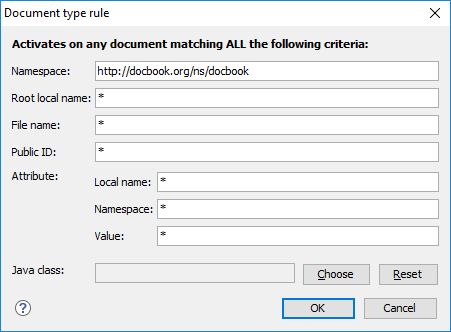
By combining multiple association rules you can instruct Oxygen XML Developer to identify the type of a document. An Oxygen XML Developer association rule holds information about Namespace, Root local name, File name, Public ID, Attribute, and Java class. Oxygen XML Developer identifies the type of a document when the document matches at least one of the association rules. This tab give you access to a Document type rule dialog box that you can use to create association rules that activate on any document matching all the criteria defined in the dialog box.
To create a new association rule, click the  New button at the bottom of the Association
Rules tab, or to edit an existing rule, click the
New button at the bottom of the Association
Rules tab, or to edit an existing rule, click the  Edit button.
Figure: Document Type Rule Dialog Box
To open the Association Rules tab of the Document type configuration dialog box, open the Preferences dialog box , go to Document Type Association, use the New, Edit, Duplicate, or Extend button, and click on the Association Rules tab.
- New
- Opens the Document type rule dialog box allowing you to create association rules.
- Edit
- Opens the Document type rule dialog box allowing you to edit the properties of the currently selected association rule.
 Delete
- Deletes the currently selected association rules from the list.
 Move Up
- Moves the selected association rule up one spot in the list.
 Move Down
- Moves the selected association rule down one spot in the list.