Menu Shortcut Keys Preferences
You can use the Menu Shortcut Keys preferences page to configure shortcut keys for the actions available in Oxygen XML Developer. The shortcuts assigned to actions are displayed in a table in this preference page. To access the full list of shortcut keys, open the Preferences dialog box and go to Menu Shortcut Keys (or simply go to ).
For a list of the most commonly used shortcuts, see Frequently Used Shortcut Keys.
Figure: Menu Shortcut Keys Preferences Page
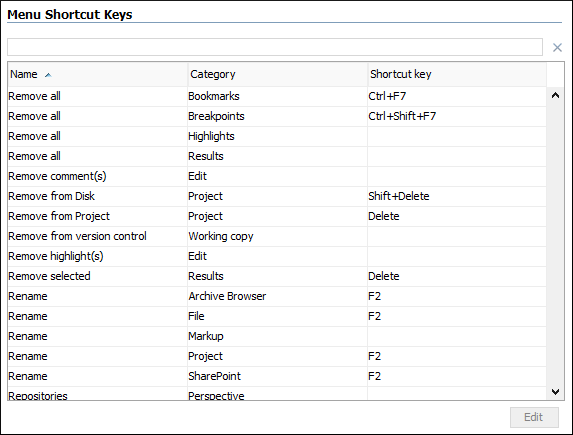
To find a specific action, you can use the filter text field to search through any of the columns in the table. You can also press shortcut key combinations on your keyboard to filter the list and click on a column header to sort that column.
The table includes the following columns or options:
- Description - A short description of the action.
- Category - A classification of the actions in categories for easier management and more flexibility in assigning multiple keys for the same action.
- Shortcut key - The combination of keyboard keys that can be used to launch the action. To add or change a shortcut key, you can either double-click a row or select the row and press the Edit button.
- 'Home' and 'End' keys are applied at line level (available on Mac OS X only) - Controls the way the HOME and END keys are interpreted. If selected, the default behavior of these keys is overridden and the cursor only moves on the current line.
How to Assign a Shortcut Key or Edit an Existing Shortcut
- Select the action in the table.
- Click the Edit button.
Step Result: The Shortcut key configuration dialog box is displayed.
Figure: Shortcut Key Configuration Dialog Box
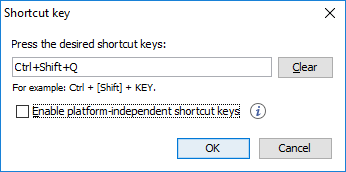
- Press the desired shortcut keys on your keyboard.
- If you need the shortcut to work on multiple
platforms, select the Enable platform-independent shortcut keys
option. In this case, the following modifiers are used:
M1represents the Command key on MacOS X, and the Ctrl key on other platforms.M2represents the Shift key.M3represents the Option key on MacOS X, and the Alt key on other platforms.M4represents the Ctrl key on MacOS X, and is undefined on other platforms.
- Click OK to save your configuration.