Example: Customizing Side TOC Using XSLT-Import/Parameter Extension Points
This topic provides some common use-cases to demonstrate how to use the WebHelp XSLT-Import extension points to customize the Table of Contents displayed on the right side of the WebHelp output (the default transformation generates a mini table of contents for the current topic and it contains links to the children of current topic, its siblings, and all of its ancestors). The first use-case uses an XSLT-Import extension point while the second uses an XSLT-Parameter extention point.
Use Case 1: WebHelp XSLT-Import extension point to change which topics are displayed in the Side TOC
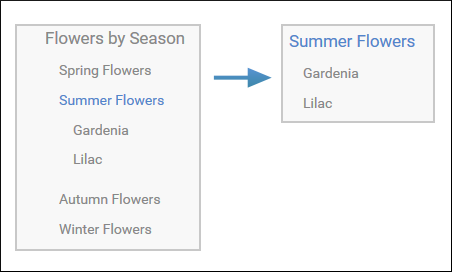
Suppose you want to customize the side TOC to only include the current topic and its child topics (while excluding its siblings and ancestors).
Figure: Example: Filtered Side Table of Contents
<xsl:template
          match="
          toc:topic
          [not(@toc = 'no')]
          [not(@processing-role = 'resource-only')]"
          mode="toc-pull" priority="10">
This template computes the link for the current topic along with the links for the sibling topics, and then propagates them recursively to the parent topic. For this specific use-case, you need to override this template so that it will produce the link for the current topic along with just the child links that the template already receives.
You can implement this functionality with a WebHelp extension plugin that uses the com.oxygenxml.webhelp.xsl.dita2webhelp extension point. This extension point allows you to specify a customization stylesheet that will override the template described above.
- In the DITA-OT-DIR\plugins\ folder, create a folder for this plugin (for example, com.oxygenxml.webhelp.custom.sidetoc).
- Create a plugin.xml file (in the folder you created in step 1) that specifies
the extension point and your customization stylesheet. For
example:
<plugin id="com.oxygenxml.webhelp.custom.sidetoc">
  <feature extension="com.oxygenxml.webhelp.xsl.dita2webhelp"
              file="custom_side_TOC.xsl"/>
</plugin>
- Create your customization stylesheet (for example, custom_side_TOC.xsl), and
edit it to override the template that produces the side
TOC:
<xsl:template match=" toc:topic [not(@toc = 'no')] [not(@processing-role = 'resource-only')]" mode="toc-pull" priority="10"> <xsl:param name="pathFromMaplist" as="xs:string"/> <xsl:param name="children" select="()" as="element()*"/> <xsl:param name="parent" select="parent::*" as="element()?"/> <xsl:apply-templates select="." mode="sideTocEntry"> <xsl:with-param name="pathFromMaplist" select="$pathFromMaplist"/> <xsl:with-param name="children" select="$children"/> </xsl:apply-templates> </xsl:template> - Use the Run DITA OT Integrator transformation scenario found in the DITA Map section in the Configure Transformation Scenario(s) dialog box.
- Run a DITA Map WebHelp Responsive transformation scenario to obtain the customized side TOC.
Use-Case 2: WebHelp XSLT-Parameter extension point to control which topics are displayed in the Side TOC from the transformation scenario
Another possibility to customize what is displayed in the side Table of Contents is to add a transformation parameter that will control the XSLT customization when the transformation scenario is applied. For this use-case, you can use the com.oxygenxml.webhelp.xsl.dita2webhelp.param extension point.
- Create a DITA-OT plugin structure by following the first 3 steps in the procedure above.
- In the customization stylesheet that you created in step 3, declare the
side_toc_only_childrenparameter and modify the template to match the topic only when theside_toc_only_childrenparameter is set to yes:<xsl:param name="side_toc_only_children" select="'yes'"/> ... <xsl:template match=" toc:topic [not(@toc = 'no')] [not(@processing-role = 'resource-only')] [$side_toc_only_children = 'yes']" ...
- Edit the plugin.xml file to specify the
com.oxygenxml.webhelp.xsl.dita2webhelp.param extension point and a custom
parameter file by adding the following
line:
<feature extension="com.oxygenxml.webhelp.xsl.dita2webhelp.param"
              file="custom_params.xml"/>
- Create a custom parameter file (for example, custom_params.xml). It should look
like
this:
<dummy> <param name="side_toc_only_children" expression="${side_toc_only_children}" if="side_toc_only_children"/> </dummy> - Use the Run DITA OT Integrator transformation scenario found in the DITA Map section in the Configure Transformation Scenario(s) dialog box.
- Edit a DITA Map WebHelp Responsive transformation scenario and
in the Parameters tab, specify the desired value (yes
or no) for your custom parameter (
side_toc_only_children). - Run the transformation scenario.