Results View
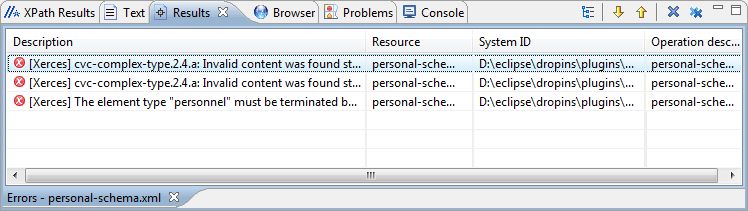
The Results view displays the messages generated as a result of user
actions such as validations, transformations, search operations, and others. Each message is a
link to the location related to the event that triggered the message. Double-clicking a
message opens the file containing the location and positions the cursor at the location
offset. The Results view is automatically opened when certain actions
generate result messages. Those actions include the following:
Figure: Results View
Results View Toolbar Actions
The view includes a toolbar with the following actions:
 Grouping Mode toggle options
- You can choose to group the result messages in a Hierarchical or Flat arrangement.
 Next
Next- Navigates to the message below the current selection.
 Previous
- Navigates to the message above the current selection.
 Remove
selected
Remove
selected- Removes the current selection from the view. This can be helpful if you want to reduce the number of messages or remove those that have already been addressed or not relevant to your task.
 Remove
all
Remove
all- Removes all messages from the view.
Results View Contextual Menu Actions
The following actions are available when the contextual menu is invoked in this view:
- Remove
- Removes selected messages from the view.
- Remove
all
- Removes all messages from the view.
 Copy
Copy- Copies information associated with the selected messages. For example:
- The file path of the document that triggered the output message.
- Error severity (error, warning, info message, etc.)
- Name of validating processor.
- The line and column in the file that triggered the message.
- Show message
- Opens a dialog box that displays the details of the message.
- Save Results
- Saves the complete list of messages in a file in text format. For each message, the included details are the same as the ones for the Copy action.
- Save Results as XML
- Saves the complete list of messages in a file in XML format. For each message, the included details are the same as the ones for the Copy action.
- Save Results as HTML
- Saves the complete list of messages in a file in HTML format. For each message, the included details are the same as the ones for the Copy action.
- Expand All
- Available when Hierarchical mode is selected. Expands all the nodes of the tree, which is useful when the messages are presented in a hierarchical mode.
- Collapse All
- Available when Hierarchical mode is selected. Collapses all the nodes of the tree, which is useful when the messages are presented in a hierarchical mode.