Validating XML DocumentsHistory | Edit
- The structural integrity and well-formedness of the document.
- A set of best practice rules (such as a maximum number of words in a paragraph).
Presenting Validation Problems in the Editing Panel
In the editing panel, the validation errors appear underlined in red, while warnings are underlined in yellow. On the desktop version, if you hover the mouse over the errors or warnings, a tooltip is displayed that provides more information about the problem.
Validation Side Panel
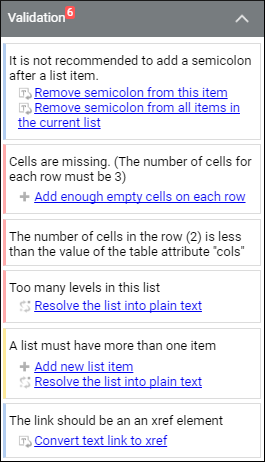
Details about the validation problems are also presented in the
Validation side panel. If it is not displayed, tap or click the
 Toggle Side
Panel button from the upper right-side corner (or swipe from right to left on
mobile devices).
Toggle Side
Panel button from the upper right-side corner (or swipe from right to left on
mobile devices).
- Red – Indicates a validation error.
- Yellow - Indicates a validation warning.
- Blue - Indicates an informational message.
Figure: Validation Side Panel
Quick Fixes to Solve Validation Problems
Oxygen XML Web Author also includes support for Quick Fixes that help you resolve validation issues that appear in XML documents by offering you proposals for automatically solving the issues with one click.
For any validation item that has a detected Quick Fix, the proposals are listed in the Validation side panel as links. On the desktop version, these links also appear in the tooltip that is displayed when hover over a problem in the editor.
For information about common errors that appear in XML documents that are validated against DTD, XSD, or Relax NG schemas, see Quick Fixes for DTD, XSD, and Relax NG Errors.
Oxygen XML Web Author also supports Schematron Quick Fixes. A developer can create custom Schematron Quick Fixes to help impose Authoring rules and provide quick solutions to fix errors. For more information, see the Schematron Quick Fixes (SQF) section in the Oxygen XML Editor User Manual. There is also an interesting Blogpost written on this subject available at: http://blog.oxygenxml.com/2015/05/schematron-checks-to-help-technical.html.