WebHelp Responsive Template Directory StructureHistory | Edit
A certain directory structure is required for the WebHelp Responsive templates. The names of folders at certain levels correspond to the names of template variants and skins, components are defined in specific files, and various resources need to be located in specific locations within the directory structure.
The templates are stored in DITA_OT_DIR/plugins/com.oxygenxml.webhelp/templates/dita.
Figure: Templates Directory Structure
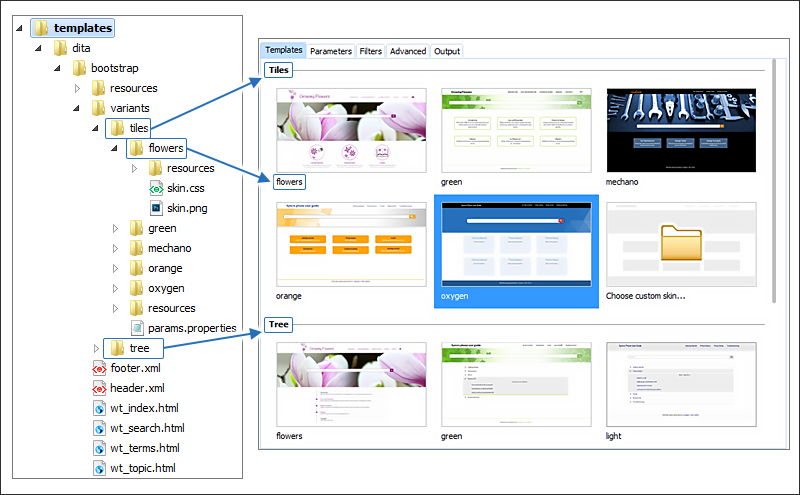
- resources Folder - Contains all additional resources used by the template, such as images, CSS, and JavaScript files.
- variants Folder - Contains the template variants, including folders for each skin. See Template Variants and Skins.
- Template Files - The HTML template files that are used to generate the output:
- wt_index.html - Used to produce the main home page of the WebHelp Responsive output. See WebHelp Responsive Main Page Template.
- wt_topic.html - Used to generate the HTML pages associated with individual topics. See WebHelp Responsive Topic Template.
- wt_search.html - Used to generate the HTML page that presents the search results. See WebHelp Responsive Search Results Template.
- wt_terms.html - Used to generate the HTML page that presents the documentation index. See WebHelp Responsive Index Terms Template.
After the transformation scenario is executed, the resources and variants folders are copied in the /oxygen-webhelp/template/ folder within the output directory (defined in the Output tab of the transformation scenario).
Template Variants and Skins
You could think of a template as being a set of WebHelp components that are placed in a predefined HTML layout. You can have multiple variants of the template. A WebHelp template variant is an instance of the template with a specific set of parameters. For example, you could have two variants of the WebHelp main page, one that displays the topics in a tiles style of layout, and another one that displays the topics in a tree style.
Each variant has its own directory that corresponds to the name of the variant. The name of the variant is displayed in the user interface when the variants are displayed (for example, in the templates tab of the transformation scenario).
Each variant directory may contain the following resources:
- Skin Directories - These folders represent skin templates for the current variant.
- params.properties File - This file specifies the values for the parameters imposed by the variant.
- resources Folder - This is an optional directory that contains resources that are specific to the current variant (such as images, CSS files, etc.) They will be copied to the output directory.
A variant skin represents a CSS file that allows you to alter the styling of the template. The CSS associated with a skin must be named skin.css and it must be stored as a first child of the skin directory.
Each skin might need additional resources (images, fonts) that must be stored in the resources directory in the root folder for that particular skin. The name of the skin directory is displayed in the user interface when you choose a skin (in the templates tab of the transformation scenario).
Each skin directory can also contain a skin.png preview image that will be displayed in the user interface and a properties file that contains a URL for the online preview of the skin. This image file must be stored as a first child of the skin directory.
For information about creating or customizing skins, see Create or Customize a WebHelp Responsive Skin.