
JSON Editor
Oxygen XML Developer Eclipse plugin includes a specialized JSON editor with various editing features for
files that have the
json file extension. It also includes a document template
to help you get started with JSON documents. The template is called
JSON and it can be found in the New Document
folder in the New from templates
wizard.Tip: You can experiment with a sample of a JSON file available at:
[OXYGEN-INSTALL-DIR]/samples/json/personal.json.
Text Mode Editor
When editing JSON documents in the Text editing mode, the usual text editing actions are
available, along with other editor-specific actions, including:
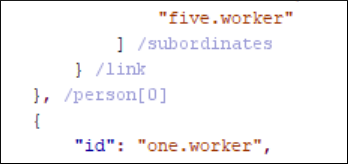
The JSON Text mode editor also offers unique features. For example, the property name is displayed after the ending bracket:
Note: You can run XPath expressions on open JSON documents, but in
Text mode the XPath results cannot be mapped in the document.
However, they can be mapped in the Grid editing mode. You can use
the Grid button at the bottom of the editor panel to switch to that
editing mode.
Grid Mode Editor
Oxygen XML Developer Eclipse plugin allows you to view and edit the JSON documents in the Grid mode. The JSON is represented in Grid mode as a compound layout of nested tables and the JSON data and structure can be easily manipulated with table-specific operations or drag and drop operations on the grid components.
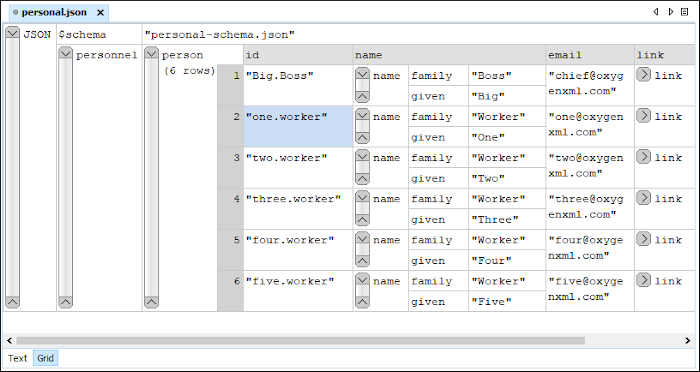
You can also use the following JSON-specific contextual actions:
- Array
- Useful when you want to convert a JSON value to array.
- Insert value before
- Inserts a value before the currently selected one.
- Insert value after
- Inserts a value after the currently selected one.
- Append value as child
- Appends a value as a child of the currently selected value.
You can customize the JSON grid appearance according to your needs. For instance, you can change the font, the cell background, foreground, or even the colors from the table header gradients. The default width of the columns can also be changed.