Applying Profiling Condition SetsEdit online
All defined Profiling
Condition Sets are available as shortcuts in the  Profiling / Conditional Text toolbar menu. Select a menu entry to
apply the condition set. The filtered content is then grayed-out in the
Author mode and Outline
view. An element is filtered-out when one of its attributes is part of the condition
set and its value does not match any of the value covered by the condition set.
Profiling / Conditional Text toolbar menu. Select a menu entry to
apply the condition set. The filtered content is then grayed-out in the
Author mode and Outline
view. An element is filtered-out when one of its attributes is part of the condition
set and its value does not match any of the value covered by the condition set.
EXAMPLE:
Suppose that you have the following document:
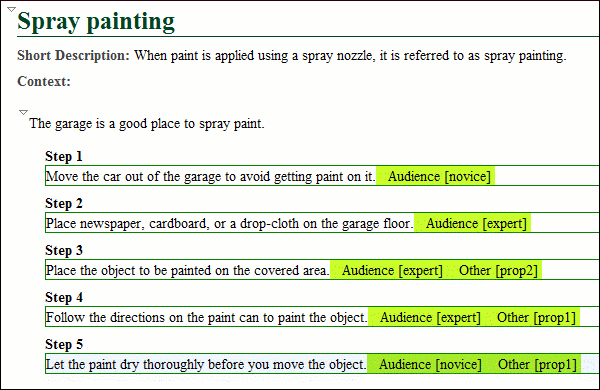
If you apply the following condition set, it means that you want to
filter out the content to only include content profiled with the
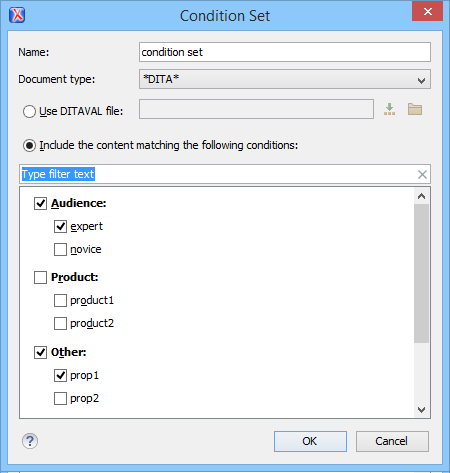
expert value
for the @audience attribute and content that has the prop1 value for
the @other attribute.This is how the document looks in Author mode
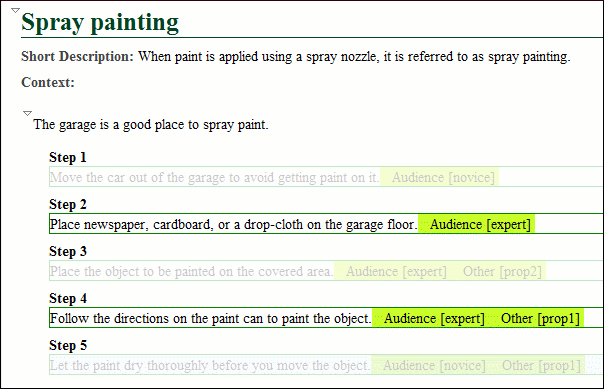
after you apply the condition set: