Technical DetailsEdit online
The Oxygen XML Editor plugin comes bundled in the Oxygen XML Editor/Author distributions. The plugin id is: com.oxygenxml.pdf.css. It is installed in the [OXYGEN-INSTALL-DIR]frameworks/dita/DITA-OT2.x/plugins/com.oxygenxml.pdf.css folder.
It has two transformation types:
- pdf-css (DITA Map PDF - based on DITA & CSS - WYSIWYG transformation) - CSS styling applied directly over a merged DITA document.
- pdf-css-html5 (DITA Map PDF - based on HTML5 & CSS transformation) - CSS styling applied over a merged HTML5 document (the merged DITA converted to HTML5).
This is how it works:
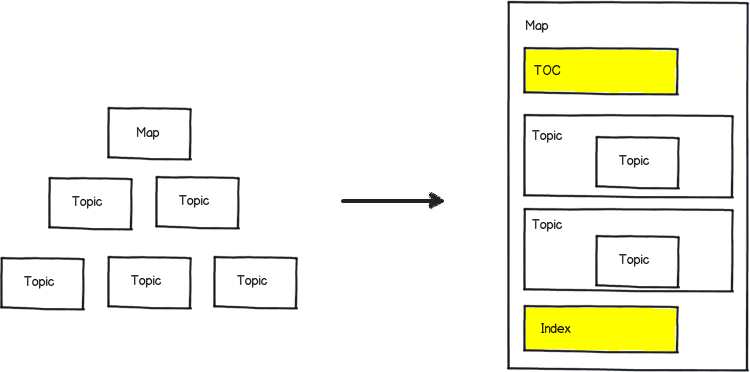
- It expands all the topic references into a temporary clone of the map, resolving keys and reused content. This is the standard DITA-OT pre-processing procedure.
- It generates a structure for the table of contents and index. The result is a merged map
with all the references resolved. This is a standard DITA-OT processing procedure, based
on the PDF2 plugin.
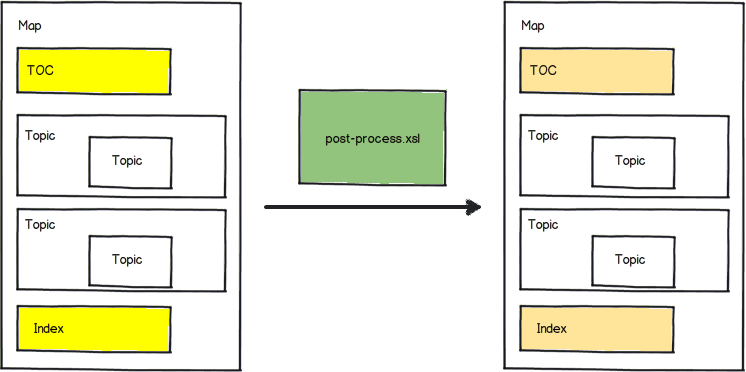
- Then it post-processes the merged map. It fixes some of the structure in the TOC and
index, moves the frontmatter and backmatter to the correct places,
transforms any change tracking and review processing instructions to elements that can be
styled later, etc. The result is another merged map.
- When using the DITA Map PDF - based on HTML5 & CSS transformation type, the merged DITA map is transformed to a single HTML5 file. The generated HTML elements copy the class attributes from the original DITA elements. In this way you can either use selectors that were designed for DITA structure, or ones for the HTML structure - see: Reusing the Styling for WebHelp and PDF Output. This step can apply customization XSLT extension points that change the default processing.
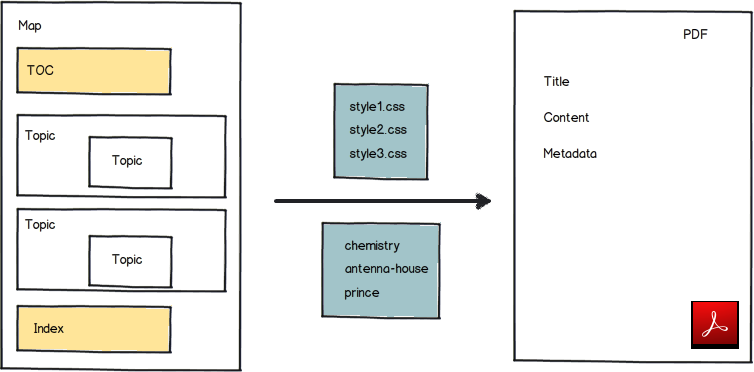
- In the last phase, it uses a collection of CSS files to style the merged map (or for the
DITA Map PDF - based on HTML5 & CSS transformation type, the
merged map in the HTML5 format with the help of the CSS processor). Note: For the DITA Map PDF - based on DITA & CSS (WYSIWYG) transformation type,, the used CSS files are those selected in the Styles drop-down menu from the toolbar in Oxygen XML Editor/Author, and they are processed along with the CSS files specified with the
args.cssparameter set in the transformation scenario.Note: For the DITA Map PDF - based on HTML5 & CSS transformation type, references to the CSS files are collected from the publishing template.