
Browsing ArchivesEdit online
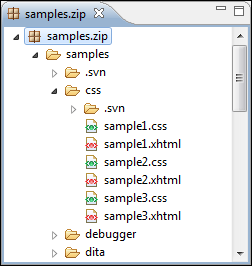
To view the contents and structure of
an archive, use one of the following methods:
- Open an archive from the Navigator view. This will open the archive in the main editing pane. The archive will be unmounted when the editor is closed.
- Use the Eclipse File System (EFS) by right-clicking the archive in the Navigator view and choosing Expand Zip Archive. This will expand the archive in the Navigator view. All the standard Navigator actions are available on the mounted archive. To close the archive, you can use the Collapse ZIP Archive action and any file opened from the expanded archive will be closed when the archive in unmounted.
Tip: If a file is not recognized by Oxygen XML Editor plugin as a supported archive
type, you can add it from the Archive preferences page.
Archive Contextual Menu Actions
The following additional actions are available from the contextual menu for archives:
 Open
Open- Opens a resource from the archive in the editor.
- Extract
- Extracts a resource from the archive in a specified folder.
 New folder
- Creates a folder as child of the selected folder in the browsed archive.
 New file
- Creates a file as child of the selected folder in the browsed archive.
 Add files
- Adds existing files as children of the selected folder in the browsed archive.
Note: On OS X, the Add file action is also available and it allows you to add one file at a time.
- Rename
- Renames a resource in the archive.
 Cut
Cut- Cuts the selected archive resource.
 Copy
Copy- Copies the selected archive resource.
 Paste
Paste- Pastes a file or folder into the archive.
 Delete
- Removes a file or folder from archive.
- Copy location
- Copies the URL location of the selected resource.
 Refresh
- Refreshes the selected resource.
- Properties
- Shows the properties of the selected resource.
For more information, watch our video demonstration about working with an EPUB in the Archive Browser view: