Publishing Template Package ContentsEdit online
An Oxygen Publishing Template package must contain a template descriptor file and some other resources (such as CSS files). All the template resources can be stored in either a ZIP archive or in a folder. It is recommended to use a ZIP archive because it is easier to share with others.
Template Descriptor FileEdit online
Each publishing template includes a descriptor file that defines the meta-data associated with template. It is an XML file that defines all the resources included in a template (such as HTML page layout files, CSS, JS, fonts, and transformation parameters).
The template descriptor file must have the .opt file extension and must be located in the templates' root folder.
A template descriptor might look like this:
<publishing-template>
    <name>Flowers</name>

    <webhelp>
        <tags>
            <tag>tree</tag>
            <tag>light</tag>
        </tags>
        <preview-image file="flowers-tree.png"/>

        <!-- Resources (CSS, favicon, logo and others) -->
        <resources>
            <!-- Main CSS file -->
            <css file="flowers.css"/>

             <!-- Resources to copy to the output folder -->
            <fileset>
                <include name="resources/**/*"/>
                <exclude name="resources/**/.svn"/>
                <exclude name="resources/**/.git"/>
            </fileset>
        </resources>

        <parameters>
            <parameter name="webhelp.show.main.page.tiles" value="no"/>
            <parameter name="webhelp.show.main.page.toc" value="yes"/>
            <parameter name="webhelp.top.menu.depth" value="3"/>
        </parameters>
    </webhelp>
</publishing-template>
Template Name and Description
Each template descriptor file requires a name element. This information is displayed as the name of the template in the transformation scenario dialog box.
Optionally, you can include a description and it displayed when the user hovers over the template in the transformation scenario dialog box.
<publishing-template>
    <name>Lorem Ipsum</name>
    <description>Lorem ipsum dolor sit amet, consectetur adipiscing elit</description>
    ...
Template Author
Optionally, you can include author information in the descriptor file and it displayed when the user hovers over the template in the transformation scenario dialog box. This information might be useful if users run into an issue or have questions about a certain template.
If you include the author element, a name is required and optionally you can include email, organization, and organizationUrl information.
<publishing-template>
    ...
    <author>
      <name>John Doe</name>
      <email>jdoe@example.com</email>
      <organization>ACME</organization>
      <organizationUrl>http://www.example.com/jdoe</organizationUrl>
    </author>
    ...
Webhelp Element
The webhelp element contains various details that define the WebHelp Responsive output. The elements that are allowed in this webhelp section specify the template tags, template preview image, resources (such as CSS, JS, fonts, logos), HTML page layout files, transformation parameters, HTML fragment extensions (used to add fragments to placeholders), or XSLT extensions.
    <webhelp>
        <tags>
          ...
        </tags>
        <preview-image file="MyPreview.png"/>

        <resources>
          ...
        </resources>

        <html-page-layouts>
          ...
        </html-page-layouts>

        <parameters>
          ...
        </parameters>
    </webhelp>
Template Tags
The tags section provides meta information about the template (such as layout type or color theme). Each tag is displayed at the top of the Templates tab window in the transformation scenario dialog box and they help the user filter and find particular templates.
<publishing-template>
    ...
    <webhelp>
      <tags>
        <tag>tree</tag>
        <tag>dark</tag>
      </tags>
Template Preview Image
The preview-image element is used to specify an image that will be displayed in
the transformation scenario dialog box. It provides a visual representation of the
template to help the user select the right template. The image dimensions should be
200 x 115 pixels and the supported image formats are:
JPEG, PNG, or GIF.
<publishing-template>
    ...
    <webhelp>
      ...
      <preview-image file="ashes/ashes-tree.png"/>
      <online-preview-url=https://www.example.com/samples/tiles/ashes</online-preview-url>
Template ResourcesEdit online
The resources section of the descriptor file specifies a set of resources (CSS, JS, fonts, logos, etc.) that are used to customize various components in generated output. These resources will be copied to the output folder during the transformation process. At least one CSS file must be included, while the other types of resources are optional.
- CSS files - One or more CSS files that will define the styles of all generated HTML pages.
- Favicon - You can specify the path to an image for the favicon associated with your website.
- Logo - You can specify the path to a logo image that will be displayed in the left side of the output header. Optionally, you can also specify a target-url that will redirect the user to the specified URL if they click the logo in the output.
- Additional Resources (JS, Fonts) - You can specify one or more sets of additional resources that will be copied to the output folder during the transformation process. These resources are specified with the fileset element and you can use one or more include and exclude elements. This semantic is similar to the ANT FileSet.
<publishing-template>
    ...
    <webhelp>
      ...
      <resources>
          <css file="css/custom_styles.css"/>
          <css file="css/custom_fonts.css"/>

          <favicon file="images/favicon.png"/>

          <logo
           file="images/logo.png"
           target-url="http://www.example.com"/>

          <fileset>
              <include name="common/**/*"/>
              <include name="JS/**/*"/>
              <exclude name="**/*.svn"/>
              <exclude name="**/*.git"/>
          </fileset>
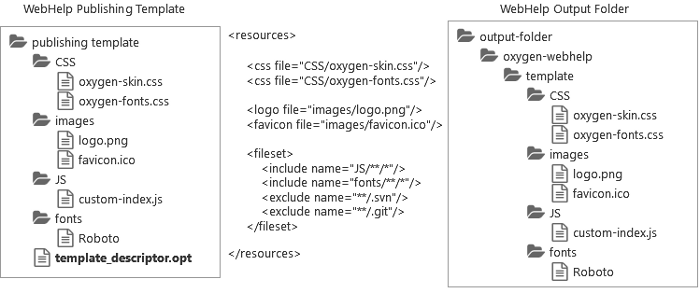
</resources>The resources specified in the template descriptor are copied to the following output folder: [WebHelp_OUTPUT_DIR]/oxygen-webhelp/template. The following graphic illustrates the mapping between the template resources and the location where they will be copied to the output folder:
Figure: Template Resources Mapping
HTML Page Layout FilesEdit online
<publishing-template>
      ...
      <webhelp>
      ...
      <!-- HTML page layout files -->
      <html-page-layout-files>
        <page-layout-file page="main" file="page-templates/wt_index.html"/>
        <page-layout-file page="search" file="page-templates/wt_search.html"/>
        <page-layout-file page="topic" file="page-templates/wt_topic.html"/>
        <page-layout-file page="index-terms" file="page-templates/wt_terms.html"/>
      </html-page-layout-files>
These HTML files are not required in the descriptor file, but if you do use the html-page-layout-files element, you must specify all four types of pages (main, search, topic, index). If you do not specify these HTML page layout files, the files from the DITA-OT-DIR/plugins/com.oxygenxml.webhelp.responsive/oxygen-webhelp/page-templates folder will be used to define the layout of each type of page.
HTML Page Components
Each type of page contains various components that control the layout of that page. The rendering of each component depends on the context where it is placed and its content depends on the transformed DITA map.
Some of the components can be used in all four types of pages, while some are only available for certain pages. For instance, the Publication Title component can be used in all pages, but the Navigation Breadcrumb component can only be used in the Topic Page.
To include a component in the output of a particular type of page, you have to reference a
specific element in that particular HTML file. All the elements associated with a component
should belong to the http://www.oxygenxml.com/webhelp/components
namespace.
whc:component_content element as a descendant of the component element.
It can specify the location as before, after, or it can wrap the component content. The
following snippet contains an example of
each:<whc:webhelp_search_input class="navbar-form wh_main_page_search" role="form" > <div class="custom-content-before">Enter search terms here:</div> <div class="custom-wrapper"> <whc:component_content/> </div> <div class="custom-content-after">Results will be displayed in a new window.</div> </whc:webhelp_search_input>
Main Page
The Main Page is the home page generated in the WebHelp Responsive output. The name of the HTML file that defines this page is wt_index.html and it is located in the following directory: DITA-OT-DIR/plugins/com.oxygenxml.webhelp.responsive/oxygen-webhelp/page-templates.
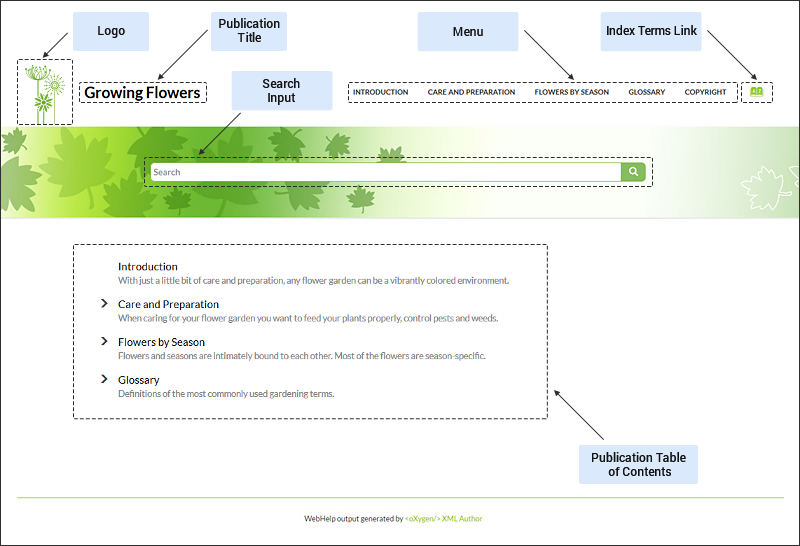
The main function of the home page is to display top level information and provide links that help you easily navigate to any of the top level topics of the publication. These links can be rendered in either a Tiles or Tree style of layout. The HTML page produced for the home page also consists of various other components, such as a logo, title, menu, search field, or index link.
Figure: Examples of Main Page Components for a Tiles Style of Layout
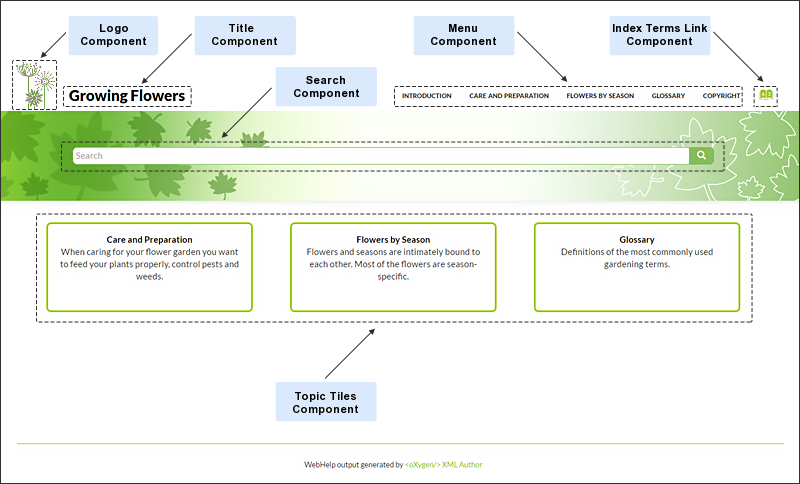
Figure: Examples of Main Page Components for a Tree Style of Layout
- Publication Title (
webhelp_publication_title) - This component generates the publication title in the output. To generate this
component, the
webhelp_publication_titleelement must be specified in the HTML file as in the following example:<whc:webhelp_publication_title xmlns:whc="http://www.oxygenxml.com/webhelp/components"/>In the output, you will find an element with the class:
wh_publication_title. - Publication Logo (
webhelp_logo) - This component generates a logo image in the output. To generate this component, the
webhelp_logoelement must be specified in the HTML file as in the following example:<whc:webhelp_logo xmlns:whc="http://www.oxygenxml.com/webhelp/components"/>In addition, you must also specify the path of the logo image in the
webhelp.logo.imagetransformation parameter (in the Parameters tab in the transformation scenario). You can set thewebhelp.logo.image.target.urlparameter to generate a link to a URL when you click the logo image.In the output, you will find an element with the class:
wh_logo. - Search Input (
webhelp_search_input) - This component is used to generate the input widget associated with search function in
the output. To generate this component, the
webhelp_search_inputelement must be specified in the HTML file as in the following example:<whc:webhelp_search_input xmlns:whc="http://www.oxygenxml.com/webhelp/components"/>In the output, you will find an element with the class:
wh_search_input. - Print Link (
webhelp_print_link) - This component is used to generate a print icon that opens the print dialog box for
your particular browser. To generate this component, the
webhelp_print_linkelement must be specified in the HTML file as in the following example:<whc:webhelp_print_link xmlns:whc="http://www.oxygenxml.com/webhelp/components"/>In the output, you will find an element with the class:
wh_print_link. - Main Page Menu (
webhelp_topics_menu) - This component generates a menu with all the documentation topics. To generate this
component, the
webhelp_topics_menuelement must be specified in the HTML file as in the following example:<whc:webhelp_topics_menu xmlns:whc="http://www.oxygenxml.com/webhelp/components"/>In the output, you will find an element with the class:
wh_topics_menu.You can control the maximum level of topics that will be included in the menu using the
webhelp.top.menu.depthtransformation parameter (in the Parameters tab of the transformation scenario).For information about customizing the menu, see How to Customize the Menu.
- Main Page Topic Tiles (
webhelp_tiles) - This component generates the tiles section in the main page. This section will contain
a tile for each root topic of the published documentation. Each topic tile has three
sections that corresponds to the topic title, short description, and image. To generate
this component, the
webhelp_tileselement must be specified in the HTML file as in the following example:<whc:webhelp_tiles xmlns:whc="http://www.oxygenxml.com/webhelp/components"/>In the output, you will find an element with the class:
wh_tiles.If you want to control the HTML structure that is generated for a WebHelp tile you can also specify the template for a tile by using the
whc:webhelp_tilecomponent, as in the following example:<whc:webhelp_tile class="col-md-4"> <!-- Place holder for tile's image --> <whc:webhelp_tile_image/> <div class="wh_tile_text"> <!-- Place holder for tile's title --> <whc:webhelp_tile_title/> <!-- Place holder for tile's shordesc --> <whc:webhelp_tile_shortdesc/> </div> </whc:webhelp_tile>
For information about customizing the tiles, see How to Configure the Tiles on the WebHelp Responsive Main Page.
- Main Page Table of Contents (
webhelp_main_page_toc) - This component generates a simplified Table of Contents. It is simplified because it
contains only two levels from the documentation hierarchy. To generate this component,
the
webhelp_main_page_tocelement must be specified in the HTML file as in the following example:<whc:webhelp_main_page_toc xmlns:whc="http://www.oxygenxml.com/webhelp/components"/>In the output, you will find an element with the class:
wh_main_page_toc. - Index Terms Link (
webhelp_indexterms_link) - This component can be used to generate a link to the index terms page
(
indexterms.html). If the published documentation does not contains any index terms, then the link will not be generated. To generate this component, thewebhelp_indexterms_linkelement must be specified in the HTML file as in the following example:<whc:webhelp_indexterms_link xmlns:whc="http://www.oxygenxml.com/webhelp/components"/>In the output, you will find an element with the class:
wh_indexterms_link. This element will contain a link to theindexterms.htmlpage. - Link to Skins Resources (
webhelp_skin_resources) - This component can be used to add a link to resources for the current WebHelp skin
(such as the CSS file). To generate this component, the
webhelp_skin_resourceselement must be specified in the HTML file as in the following example:<whc:webhelp_skin_resources/>
In the output, you will find a link to the skin resources.
Topic Page
The Topic Page is the page generated for each DITA topic in the WebHelp Responsive output. The name of the HTML file that defines this page is wt_topic.html and it is located in the following directory: DITA-OT-DIR/plugins/com.oxygenxml.webhelp.responsive/oxygen-webhelp/page-templates.
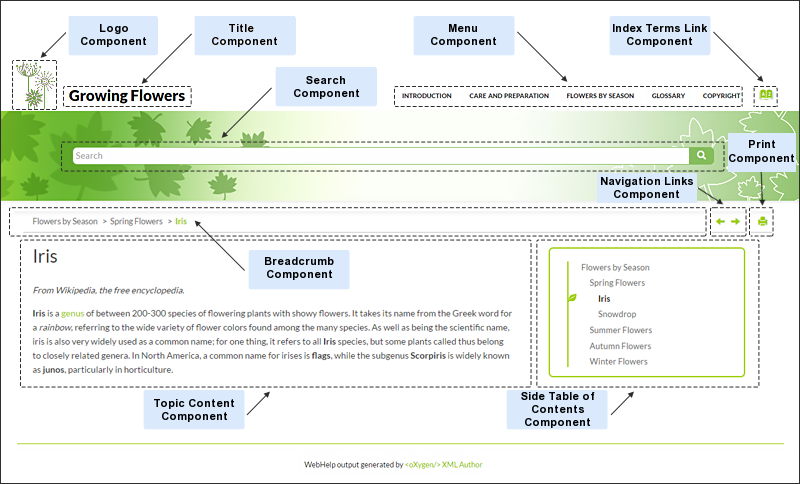
The HTML pages produced for each topic consist of the topic content along with various other additional components, such as a title, menu, navigation breadcrumb, print icon, or side table of contents.
Figure: Examples of Topic Page Components
The following components can be referenced in the Topic Page (wt_topic.html) file:
- Publication Title (
webhelp_publication_title) - This component generates the publication title in the output. To generate this
component, the
webhelp_publication_titleelement must be specified in the HTML file as in the following example:<whc:webhelp_publication_title xmlns:whc="http://www.oxygenxml.com/webhelp/components"/>In the output, you will find an element with the class:
wh_publication_title. - Publication Logo (
webhelp_logo) - This component generates a logo image in the output. To generate this component, the
webhelp_logoelement must be specified in the HTML file as in the following example:<whc:webhelp_logo xmlns:whc="http://www.oxygenxml.com/webhelp/components"/>In addition, you must also specify the path of the logo image in the
webhelp.logo.imagetransformation parameter (in the Parameters tab in the transformation scenario). You can set thewebhelp.logo.image.target.urlparameter to generate a link to a URL when you click the logo image.In the output, you will find an element with the class:
wh_logo. - Search Input (
webhelp_search_input) - This component is used to generate the input widget associated with search function in
the output. To generate this component, the
webhelp_search_inputelement must be specified in the HTML file as in the following example:<whc:webhelp_search_input xmlns:whc="http://www.oxygenxml.com/webhelp/components"/>In the output, you will find an element with the class:
wh_search_input. - Topic Breadcrumb (
webhelp_breadcrumb) - This component generates a breadcrumb that displays the path of the current topic. To
generate this component, the
webhelp_breadcrumbelement must be specified in the HTML file as in the following example:<whc:webhelp_breadcrumb xmlns:whc="http://www.oxygenxml.com/webhelp/components"/>In the output, you will find an element with the class:
wh_breadcrumb. This element will contain a list with items that correspond to the topics in the path. The first item in the list has a link to the main page with thehomeclass. The last item in the list corresponds to the current topic and has theactiveclass set. - Navigation Links (
webhelp_navigation_links) - This component generates navigation links to the next and previous topics. To generate
this component, the
webhelp_navigation_linkselement must be specified in the HTML file as in the following example:<whc:webhelp_navigation_links xmlns:whc="http://www.oxygenxml.com/webhelp/components"/>In the output, you will find an element with the class:
wh_navigation_links. This element will contain the links to the next and previous topics. - Print Link (
webhelp_print_link) - This component is used to generate a print icon that opens the print dialog box for
your particular browser. To generate this component, the
webhelp_print_linkelement must be specified in the HTML file as in the following example:<whc:webhelp_print_link xmlns:whc="http://www.oxygenxml.com/webhelp/components"/>In the output, you will find an element with the class:
wh_print_link. - Topic Content (
webhelp_topic_content) - This component generates the content of a topic and it represent the content of the
HTML files as they are produced by the DITA-OT processor. To generate this component,
the
webhelp_topic_contentelement must be specified in the HTML file as in the following example:<whc:webhelp_topic_content xmlns:whc="http://www.oxygenxml.com/webhelp/components"/>In the output, you will find an element with the class:
wh_topic_content. - Publication TOC (
webhelp_publication_toc) - This component generates a mini table of contents for the current topic (on the left
side). It will contain links to the children of current topic, its siblings, and all of
its ancestors. To generate this component, the
webhelp_publication_tocelement must be specified in the HTML file as in the following example:<whc:webhelp_publication_toc xmlns:whc="http://www.oxygenxml.com/webhelp/components"/>In the output, you will find an element with the class:
wh_publication_toc. This element will contain links to the topics that are close to the current topic. - Topic TOC (
webhelp_topic_toc) - This component generates a topic table of contents for the current topic (on the right
side). This table of contents contains links to each section within the current topic
and the section corresponding to the current scroll position is highlighted. To generate
this component, the
webhelp_topic_tocelement must be specified in the HTML file as in the following example:<whc:webhelp_topic_toc xmlns:whc="http://www.oxygenxml.com/webhelp/components"/>In the output, you will find an element with the class:
wh_topic_toc. This element will contain links to the topics that are close to the current topic. - Expand/Collapse Sections (
webhelp_expand_collapse_sections) - This component is used to generate an icon that expands or collapses sections listed
in the side table of contents within a topic. To generate this component, the
webhelp_expand_collapse_sectionselement must be specified in the HTML file as in the following example:<whc:webhelp_expand_collapse_sections xmlns:whc="http://www.oxygenxml.com/webhelp/components"/>In the output, you will find an element with the class:
webhelp_expand_collapse_sections. - Topic Feedback (
webhelp_feedback) - This component generates a placeholder for where the comments section will be
presented. To generate this component, the
webhelp_feedbackelement must be specified in the HTML file as in the following example:<whc:webhelp_feedback xmlns:whc="http://www.oxygenxml.com/webhelp/components"/> - Main Page Menu (
webhelp_topics_menu) - This component generates a menu with all the documentation topics. To generate this
component, the
webhelp_topics_menuelement must be specified in the HTML file as in the following example:<whc:webhelp_topics_menu xmlns:whc="http://www.oxygenxml.com/webhelp/components"/>In the output, you will find an element with the class:
wh_topics_menu.You can control the maximum level of topics that will be included in the menu using the
webhelp.top.menu.depthtransformation parameter (in the Parameters tab of the transformation scenario).For information about customizing the menu, see How to Customize the Menu.
- Index Terms Link (
webhelp_indexterms_link) - This component can be used to generate a link to the index terms page
(
indexterms.html). If the published documentation does not contains any index terms, then the link will not be generated. To generate this component, thewebhelp_indexterms_linkelement must be specified in the HTML file as in the following example:<whc:webhelp_indexterms_link xmlns:whc="http://www.oxygenxml.com/webhelp/components"/>In the output, you will find an element with the class:
wh_indexterms_link. This element will contain a link to theindexterms.htmlpage. - Child Links (
webhelp_child_links) - For all topics with subtopics (child topics), this component generates a list of links
to each child topic. To generate this component, the
webhelp_child_linkselement must be specified in the HTML file as in the following example:<whc:webhelp_child_links xmlns:whc="http://www.oxygenxml.com/webhelp/components"/> - Related Links (
webhelp_related_links) - For all topics that contain related links, this component generates a list of related
links that will appear in the output. To generate this component, the
webhelp_related_linkselement must be specified in the HTML file as in the following example:<whc:webhelp_related_links xmlns:whc="http://www.oxygenxml.com/webhelp/components"/> - Link to Skins Resources (
webhelp_skin_resources) - This component can be used to add a link to resources for the current WebHelp skin
(such as the CSS file). To generate this component, the
webhelp_skin_resourceselement must be specified in the HTML file as in the following example:<whc:webhelp_skin_resources/>
In the output, you will find a link to the skin resources.
Search Results Page
The Search Results Page is the page generated that present search results in the WebHelp Responsive output. The name of the HTML file that defines this page is wt_search.html and it is located in the following directory: DITA-OT-DIR/plugins/com.oxygenxml.webhelp.responsive/oxygen-webhelp/page-templates.
The HTML page that is produced consists of a search results component along with various other additional components, such as a title, menu, or index link.
Figure: Examples of Search Results Page Components
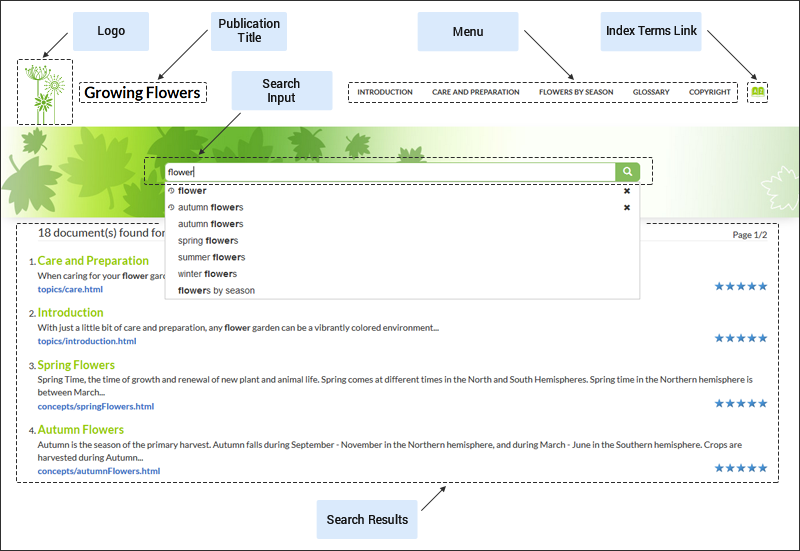
The following components can be referenced in the Search Results Page (wt_search.html) file:
- Publication Title (
webhelp_publication_title) - This component generates the publication title in the output. To generate this
component, the
webhelp_publication_titleelement must be specified in the HTML file as in the following example:<whc:webhelp_publication_title xmlns:whc="http://www.oxygenxml.com/webhelp/components"/>In the output, you will find an element with the class:
wh_publication_title. - Publication Logo (
webhelp_logo) - This component generates a logo image in the output. To generate this component, the
webhelp_logoelement must be specified in the HTML file as in the following example:<whc:webhelp_logo xmlns:whc="http://www.oxygenxml.com/webhelp/components"/>In addition, you must also specify the path of the logo image in the
webhelp.logo.imagetransformation parameter (in the Parameters tab in the transformation scenario). You can set thewebhelp.logo.image.target.urlparameter to generate a link to a URL when you click the logo image.In the output, you will find an element with the class:
wh_logo. - Search Input (
webhelp_search_input) - This component is used to generate the input widget associated with search function in
the output. To generate this component, the
webhelp_search_inputelement must be specified in the HTML file as in the following example:<whc:webhelp_search_input xmlns:whc="http://www.oxygenxml.com/webhelp/components"/>In the output, you will find an element with the class:
wh_search_input. - Search Results (
webhelp_search_results) - This component is used to generate a placeholder to signal where the search results
will be presented in the output. To generate this component, the
webhelp_search_resultselement must be specified in the HTML file as in the following example:<whc:webhelp_search_results xmlns:whc="http://www.oxygenxml.com/webhelp/components"/>In the output, you will find an element with the class:
wh_search_results. - Print Link (
webhelp_print_link) - This component is used to generate a print icon that opens the print dialog box for
your particular browser. To generate this component, the
webhelp_print_linkelement must be specified in the HTML file as in the following example:<whc:webhelp_print_link xmlns:whc="http://www.oxygenxml.com/webhelp/components"/>In the output, you will find an element with the class:
wh_print_link. - Main Page Menu (
webhelp_topics_menu) - This component generates a menu with all the documentation topics. To generate this
component, the
webhelp_topics_menuelement must be specified in the HTML file as in the following example:<whc:webhelp_topics_menu xmlns:whc="http://www.oxygenxml.com/webhelp/components"/>In the output, you will find an element with the class:
wh_topics_menu.You can control the maximum level of topics that will be included in the menu using the
webhelp.top.menu.depthtransformation parameter (in the Parameters tab of the transformation scenario).For information about customizing the menu, see How to Customize the Menu.
- Index Terms Link (
webhelp_indexterms_link) - This component can be used to generate a link to the index terms page
(
indexterms.html). If the published documentation does not contains any index terms, then the link will not be generated. To generate this component, thewebhelp_indexterms_linkelement must be specified in the HTML file as in the following example:<whc:webhelp_indexterms_link xmlns:whc="http://www.oxygenxml.com/webhelp/components"/>In the output, you will find an element with the class:
wh_indexterms_link. This element will contain a link to theindexterms.htmlpage. - Link to Skins Resources (
webhelp_skin_resources) - This component can be used to add a link to resources for the current WebHelp skin
(such as the CSS file). To generate this component, the
webhelp_skin_resourceselement must be specified in the HTML file as in the following example:<whc:webhelp_skin_resources/>
In the output, you will find a link to the skin resources.
Index Terms Page
The Index Terms Page is the page generated that presents index terms in the WebHelp Responsive output. The name of the HTML file that defines this page is wt_terms.html and it is located in the following directory: DITA-OT-DIR/plugins/com.oxygenxml.webhelp.responsive/oxygen-webhelp/page-templates.
The HTML page that is produced consists of an index terms section along with various other additional components, such as a title, menu, or search field.
An alphabet that contains the first letter of the documentation index terms is generated at the top of the index page. Each letter represents a link to a specific indices section.
Figure: Examples of Index Terms Page Components
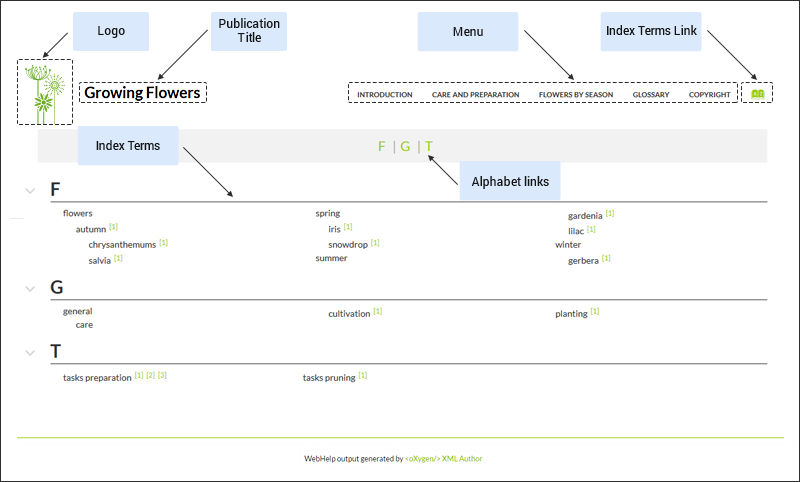
The following components can be referenced in the Index Terms Page (wt_terms.html) file:
- Publication Title (
webhelp_publication_title) - This component generates the publication title in the output. To generate this
component, the
webhelp_publication_titleelement must be specified in the HTML file as in the following example:<whc:webhelp_publication_title xmlns:whc="http://www.oxygenxml.com/webhelp/components"/>In the output, you will find an element with the class:
wh_publication_title. - Publication Logo (
webhelp_logo) - This component generates a logo image in the output. To generate this component, the
webhelp_logoelement must be specified in the HTML file as in the following example:<whc:webhelp_logo xmlns:whc="http://www.oxygenxml.com/webhelp/components"/>In addition, you must also specify the path of the logo image in the
webhelp.logo.imagetransformation parameter (in the Parameters tab in the transformation scenario). You can set thewebhelp.logo.image.target.urlparameter to generate a link to a URL when you click the logo image.In the output, you will find an element with the class:
wh_logo. - Search Input (
webhelp_search_input) - This component is used to generate the input widget associated with search function in
the output. To generate this component, the
webhelp_search_inputelement must be specified in the HTML file as in the following example:<whc:webhelp_search_input xmlns:whc="http://www.oxygenxml.com/webhelp/components"/>In the output, you will find an element with the class:
wh_search_input. - Print Link (
webhelp_print_link) - This component is used to generate a print icon that opens the print dialog box for
your particular browser. To generate this component, the
webhelp_print_linkelement must be specified in the HTML file as in the following example:<whc:webhelp_print_link xmlns:whc="http://www.oxygenxml.com/webhelp/components"/>In the output, you will find an element with the class:
wh_print_link. - Main Page Menu (
webhelp_topics_menu) - This component generates a menu with all the documentation topics. To generate this
component, the
webhelp_topics_menuelement must be specified in the HTML file as in the following example:<whc:webhelp_topics_menu xmlns:whc="http://www.oxygenxml.com/webhelp/components"/>In the output, you will find an element with the class:
wh_topics_menu.You can control the maximum level of topics that will be included in the menu using the
webhelp.top.menu.depthtransformation parameter (in the Parameters tab of the transformation scenario).For information about customizing the menu, see How to Customize the Menu.
- Index Terms Link (
webhelp_indexterms_link) - This component can be used to generate a link to the index terms page
(
indexterms.html). If the published documentation does not contains any index terms, then the link will not be generated. To generate this component, thewebhelp_indexterms_linkelement must be specified in the HTML file as in the following example:<whc:webhelp_indexterms_link xmlns:whc="http://www.oxygenxml.com/webhelp/components"/>In the output, you will find an element with the class:
wh_indexterms_link. This element will contain a link to theindexterms.htmlpage. - Link to Skins Resources (
webhelp_skin_resources) - This component can be used to add a link to resources for the current WebHelp skin
(such as the CSS file). To generate this component, the
webhelp_skin_resourceselement must be specified in the HTML file as in the following example:<whc:webhelp_skin_resources/>
In the output, you will find a link to the skin resources.
HTML Fragment Extension PointsEdit online
The HTML pages contain component placeholders that can be used to insert custom HTML fragments.
<publishing-template>
    ...
    <webhelp>
      ...
      <html-fragments>
        <fragment
          file="html-fragments/webhelp.fragment.welcome"
          placeholder="webhelp.fragment.welcome"/>
        <fragment
          file="html-fragments/webhelp.fragment.footer.html"
          placeholder="webhelp.fragment.footer"/>
      </html-fragments>
Some of these placeholders are left empty in the default output configurations, but you can use them to insert custom content.
Each placeholder has an associated parameter in the transformation. These predefined empty placeholder parameters are illustrated and described below.
Figure: Predefined Placeholders Diagram
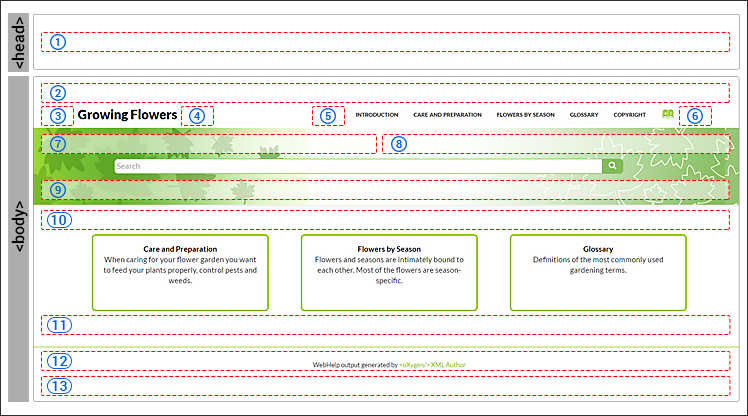
- 1- webhelp.fragment.head
- In the generated output it inserts a given XHTML
fragment in the
<head>element. The value of the parameter can be either an XHTML fragment or a path to a file that contains a well-formed XHTML fragment. - 2- webhelp.fragment.before.body
- In the generated output it displays a given XHTML fragment before the page body. The value of the parameter can be either an XHTML fragment or a path to a file that contains a well-formed XHTML fragment.
- 3- webhelp.fragment.before.logo_and_title
- In the generated output it displays a given XHTML fragment before the logo and title. The value of the parameter can be either an XHTML fragment or a path to a file that contains a well-formed XHTML fragment.
- 4- webhelp.fragment.after.logo_and_title
- In the generated output it displays a given XHTML fragment after the logo and title. The value of the parameter can be either an XHTML fragment or a path to a file that contains a well-formed XHTML fragment.
- 5- webhelp.fragment.before.top_menu
- In the generated output it displays a given XHTML fragment before the top menu. The value of the parameter can be either an XHTML fragment or a path to a file that contains a well-formed XHTML fragment.
- 6- webhelp.fragment.after.top_menu
- In the generated output it displays a given XHTML fragment after the top menu. The value of the parameter can be either an XHTML fragment or a path to a file that contains a well-formed XHTML fragment.
- 7- webhelp.fragment.before.main.page.search
- In the generated output it displays a given XHTML fragment before the search field. The value of the parameter can be either an XHTML fragment or a path to a file that contains a well-formed XHTML fragment.
- 8- webhelp.fragment.welcome
- In the generated output it displays a given XHTML fragment as a welcome message (or title). The value of the parameter can be either an XHTML fragment or a path to a file that contains a well-formed XHTML fragment.
- 9- webhelp.fragment.after.main.page.search
- In the generated output it displays a given XHTML fragment after the search field. The value of the parameter can be either an XHTML fragment or a path to a file that contains a well-formed XHTML fragment.
- 10- webhelp.fragment.before.toc_or_tiles
- In the generated output it displays a given XHTML fragment before the table of contents or tiles in the main page. The value of the parameter can be either an XHTML fragment or a path to a file that contains a well-formed XHTML fragment.
- 11- webhelp.fragment.after.toc_or_tiles
- In the generated output it displays a given XHTML fragment after the table of contents or tiles in the main page. The value of the parameter can be either an XHTML fragment or a path to a file that contains a well-formed XHTML fragment.
- 12- webhelp.fragment.footer
- In the generated output it displays a given XHTML fragment as the page footer. The value of the parameter can be either an XHTML fragment or a path to a file that contains a well-formed XHTML fragment.
- 13- webhelp.fragment.after.body
- In the generated output it displays a given XHTML fragment after the page body. The value of the parameter can be either an XHTML fragment or a path to a file that contains a well-formed XHTML fragment.
XSLT Extension PointsEdit online
<publishing-template>
    ...
    <webhelp>
        ...
        <xslt>
            <extension
              id="com.oxygenxml.webhelp.xsl.dita2webhelp"
              file="xsl/customDita2webhelp.xsl"/>
            <extension
              id="com.oxygenxml.webhelp.xsl.createMainPage"
              file="xsl/customMainPage.xsl"/>
</xslt>getParameter(param.name) function
from the http://www.oxygenxml.com/functions namespace.Transformation ParametersEdit online
<publishing-template>
    ...
    <webhelp>
      ...
      <parameters>
        <parameter
          name="webhelp.show.main.page.toc"
          value="yes"/>
        <parameter
          name="webhelp.top.menu.depth"
          value="3"/>
        <parameter
          name="webhelp.fragment.welcome"
          value="html-fragment/webhelp.fragment.welcome.html"
          type="filePath"/>
      </parameters>
    </webhelp>
The following information can be specified in the parameter element:
- Parameter name
-
The name of the parameter. It may be one of the WebHelp Responsive transformation parameters or a DITA-OT HTML-based output parameter.
Note: It is not recommended to specify an input/output parameter in the descriptor file (such as the input Map, DITAVAL file, or temporary directory).Attention: JVM arguments like -Xmx cannot be specified as a transformation parameter. - Parameter Value
- The value of the parameter. It should be a relative path to the template root folder for file paths parameters.
- Parameter Type
- The type of the parameter:
stringorfilepath. Thestringvalue is default.
After creating a publishing template and adding it to the templates gallery, when you select the template in the transformation scenario dialog box, the Parameters tab will automatically be updated to include the parameters defined in the descriptor file. These parameters are displayed in italics.