Spell Check Multiple FilesEdit online
The  Check Spelling in Files
action allows you to check the spelling on multiple local or remote documents. This action is
available in the following locations:
Check Spelling in Files
action allows you to check the spelling on multiple local or remote documents. This action is
available in the following locations:
Check Spelling in Files
action allows you to check the spelling on multiple local or remote documents. This action is
available in the following locations:- The Edit menu.
- The contextual menu of the Project view.
- When editing DITA documents, the contextual menu of the DITA Maps Manager view.
Figure: Check Spelling in Files Dialog Box
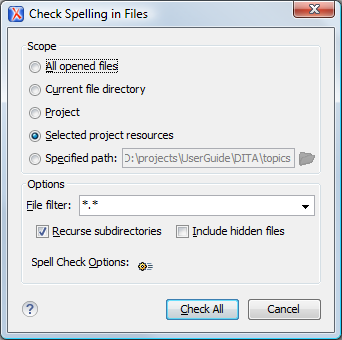
The following scopes are available:
- All opened files - The spell check is performed in all opened files.
- Directory of the current file - All the files in the folder of the current edited file.
- Project files - All files from the current project.
- Selected project files - The selected files from the current project.
- Specified path - Checks the spelling in the files located at a path that you specify.
The Options section includes the following options:
- File filter - Allow you to filter the files from the selected scope.
- Recurse subdirectories - When selected, the spell check is performed recursively for the specified scope. The one exception is that this option is ignored if the scope is set to All opened files.
- Include hidden files - When selected, the spell check is also performed in the hidden files.
- Spell Check Options - The spell check processor uses the options available in the Spell Check preferences panel .
When working with DITA documents, if you invoke the Check Spelling in Files action in the DITA Maps Manager view, a slightly different version of the dialog box is displayed:
Figure: Check Spelling in Files Dialog Box (Invoked from the DITA Maps Manager View)
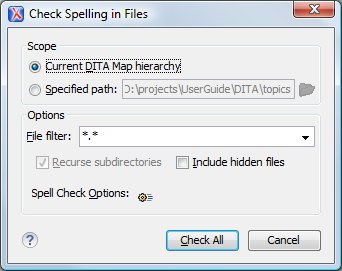
The following scopes are available when
you check the spelling in files from the DITA Maps Manager:
- Current DITA Map hierarchy - All the files referenced in the currently selected DITA map, opened in the DITA Maps Manager view.
- Specified path - Checks the spelling in the files located at a path that you specify.