Randomize XML Text Content
Oxygen XML Developer includes an action that randomizes the text content of an XML
document. This action is available in the menu. It is helpful if you need to send XML samples to the Oxygen support team
and you want to keep the text content confidential. It opens a dialog box that allows you to
select the resources for which the text content will be randomized. You can then save the
resources and send them to the Oxygen support team without fear of compromising sensitive or
private data.
Warning: Before using this action, it is highly recommended that you
copy the XML resources to be processed, save them in a separate folder, and then perform
this operation on the copies instead of the original files. Otherwise, you may lose your
original content.
Figure: Randomize XML Text Content Dialog Box
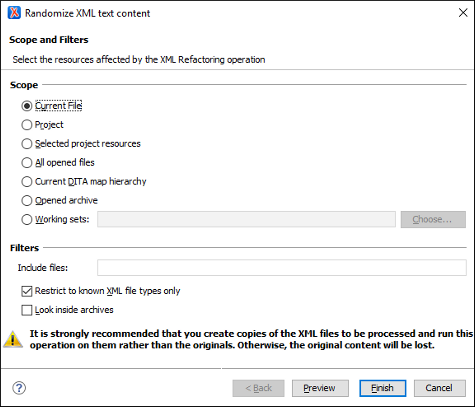
The Randomize XML Text Content dialog box includes the following options:
- Scope
- Allows you to select the set of files whose text content will be randomized by the operation. You can select from predefined resource sets (such as the current file, your whole project, the current DITA map hierarchy for DITA projects, etc.) or you can define your own set of resources by creating a working set.
- Filters
- This section includes the following options:
- Include files - Allows you to filter the selected resources by using a file pattern. For example, to restrict the operation to only analyze build files you could use build*.xml for the file pattern.
- Restrict only to known XML file types - When selected, only resources with a known XML file type will be affected by the operation.
- Look inside archives - When selected, the resources inside archives will also be affected.