Installing Oxygen XML Developer using the Java Web Start (JWS) Installer
Oxygen XML Developer provides the tools to create your own JWS distribution that
can be installed on a custom web server. The advantages of a JWS distribution include:
- Oxygen XML Developer is run locally, not inside a web browser, overcoming many of the browser compatibility problems common to applets.
-
JWS ensures that the most current version of the application will be deployed, as well as the correct version of JRE.
-
Applications launched with Java Web Start are cached locally. Thus, an already downloaded application is launched on par with a traditionally installed application.
- You can preconfigure Oxygen XML Developer and the rest of your team will use the same preferences and frameworks.
Important: If you want to create your own JWS distribution package, please
contact Syncro Soft for permission through a Value Added Reseller
Agreement.
Note: A code signing certificate is needed to sign the JWS distribution. The following
procedure assumes that you already have such a certificate (for example, Thawte™, or Verisign™).
The following schematic depicts the Oxygen XML Developer Java Web Start deployment procedure:
Figure: Java Web Start Deployment Procedure
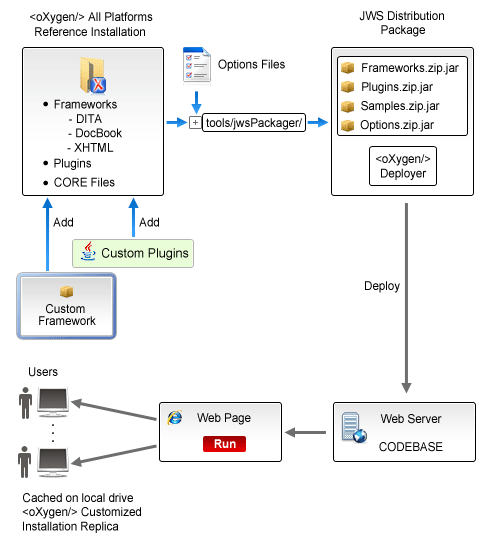
To deploy an Oxygen XML Developer installation on a server.