Administration PageHistory | Edit
Details about the Administration Page.
Oxygen XML Web Author Component includes a user-friendly Administration Page that helps you to configure your instance of the Oxygen XML Web Author Component. You can use this page to configure your License, Plugins, Frameworks, and Proxy settings. You need to enable the Administration Page before you can access it, but once you do, you can access it from a link on the top-right corner of the Dashboard page.
Enabling the Administration Page
- Configure Tomcat to use a security
Realmelement. Refer to the Tomcat Documentation for more information. - Edit the tomcat-users.xml file from your Tomcat installation and configure a user for the admin role.
- Your Administration Page is now enabled. To access it, go to the following URL:
http://example.com:8080/oxygen-webapp/app/admin.html
where http://example.com:8080/oxygen-webapp is the URL of your instance of the Oxygen XML Web Author Component. - You will be prompted for authentication credentials and you will enter those configured in the steps above.
Accessing the Administration Page
You can easily access the Administration page from a link on the Dashboard page.
Figure: Administration Page Link

How to Hide the Administration Page Link
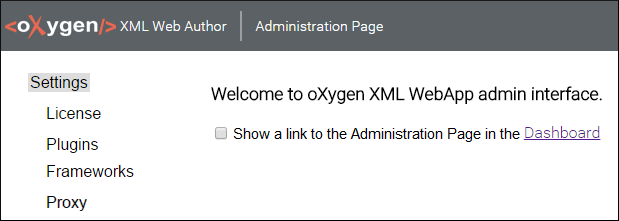
You can hide the Administration Page link from regular users by disabling the Show a link to the Administration Page option that is available in the Settings section of the Administration Page.
Figure: Show Administration Page Link Option
Types of Settings in the Administration Page
- License - Allows you to configure a license server connection.
- Plugins - Allows you to add and configure plugins for your Oxygen XML Web Author Component.
- Frameworks - Allows you to add or remove frameworks for your Oxygen XML Web Author Component.
- Proxy - Allows you to configure the proxy settings for your Oxygen XML Web Author Component.