Generating IDs for Elements in Author ModeHistory | Edit
Oxygen XML Editor allows you to manually assign or edit values of id
attributes in Author mode by using the Attributes View or an in-place attribute
editor. Oxygen XML Editor also includes mechanisms to generate ID values for
elements, either on-request or automatically, in DITA, DocBook, or TEI documents.
Generate IDs On-Request
id attribute.Automatically Generate IDs
Oxygen XML Editor includes an option to automatically add unique ID values to certain elements when they are created in Author mode. The Auto generate IDs for elements option can be found in the ID Options dialog box that is displayed when you select the ID Options action from the framework-specific menu (DITA, DocBook, or TEI). If enabled, Oxygen XML Editor automatically generates unique ID values for elements that are listed in this dialog box. You can use this dialog box to customize the format of the ID values and choose which elements will have their ID values automatically generated (for example, you can customize the list of elements to include those that you most often need to identify).
ID Options Dialog Box
Figure: ID Options Dialog Box
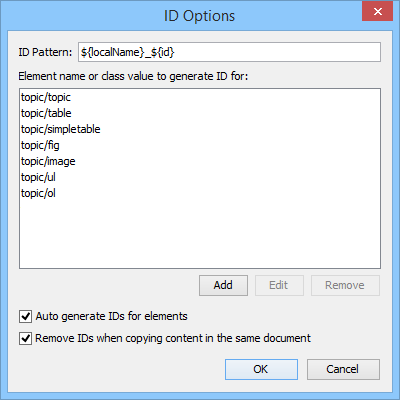
The ID Options dialog box allows you to configure the following options in regards to generating ID values:
- ID Pattern
- The pattern for the ID values that will be generated. This text field can be customized using constant strings or any of the Oxygen XML Editor Editor Variables.
- Element name or class value to generate ID for
- The elements for which ID values will be generated, specified using class attribute values. To customize the list, use the Add, Edit, or Remove buttons.
- Auto generate IDs for elements
- If enabled, Oxygen XML Editor will automatically generate unique IDs for the elements listed in this dialog box when they are created in Author mode.
- Remove IDs when copying content in the same document
- When copying and pasting content in the same document, this option allows you
to control whether or not pasted elements that are listed in this dialog box
should retain their existing IDs. To retain the element IDs, disable this
option.Note: This option does not have an effect on content that is cut and pasted.
Duplicating Elements with Existing IDs
- If the Auto generate IDs for elements option is enabled and you duplicate elements with existing IDs, Oxygen XML Editor assigns new, unique ID values to the duplicates.
- If the Auto generate IDs for elements option is disabled and you duplicate elements with existing IDs, the ID values are removed from the duplicates. However, when elements are duplicated in the same document, this option has no effect and IDs are preserved if the Remove IDs when copying content in the same document option is disabled.
- If the Remove IDs when copying content in the same document option is enabled, the ID values are removed from elements that are duplicated in the same document. However, enabling this option has no effect if the Auto generate IDs for elements option is enabled.
- If the Remove IDs when copying content in the same document option is disabled, the ID values are preserved when elements are duplicated in the same document. This option has no affect on elements that are duplicated in other documents.