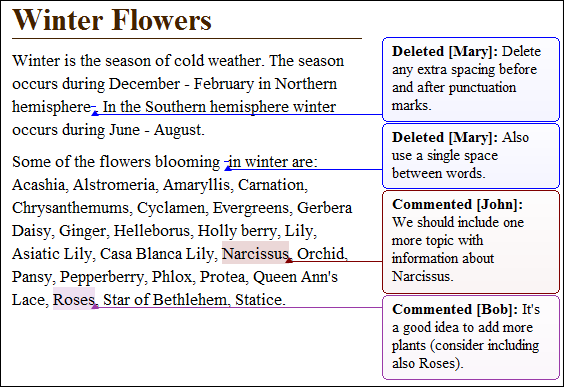
A callout is a vertical stripe, with a balloon-like look, that Oxygen XML Editor displays in the right side of the editing area. Callouts are decorated with a colored border and also have a colored background. A horizontal line, which has the same color as the border, connects text fragments with their corresponding callouts. Oxygen XML Editor assigns an individual color for the callouts depending on the user who is editing the document. To customize the list of these colors, open the Preferences dialog box and go to . You are able to add, edit, or remove colors in this list. You can choose to use the same color for any user who modifies the content or inserts a comment. To do this, select the fixed option and choose a color from the color box. Once you set a fixed color for a user you are able to edit it. Press the color box and select a different color from the Choose color dialog box.
Oxygen XML Editor uses callouts to provide an enhanced view of the changes you, or other
authors make to a document. They hold specific information depending on their type. In
addition, Oxygen XML Editor uses callouts to display comments that you
associate with fragments of the document you are editing. For more information about editing
comments, go to Managing Comments. To enable callouts, open the
Preferences dialog box and go to . Enable the following options:


- Comments - Oxygen XML Editor displays comment callouts when
you insert a comment. You can use two types of comments in Oxygen XML Editor:
- Author Review Comments - Comments that you associate with specific fragments of text.
- Callout Comments - Comments that you add in an already existing insertion or deletion callout.
Figure: Comment Callouts
- Track Changes deletions - Oxygen XML Editor displays deletion callouts when you delete a fragment of text. By default, a deletion callout contains the type of callout (Deleted) and the name of the author that makes the deletion. You are able to customize the content of a deletion callout to display the date and time of the deletion and the deleted fragment itself. To do this, open the Preferences dialog box, go to , and enable Show review time and Show deleted content in callout.
Figure: Deletion Callouts
- Track Changes insertions - Oxygen XML Editor displays insertion callouts when you insert a fragment of text. By default, an insertion callout contains the type of callout (Inserted) and the name of the author that makes the insertion. You are able to customize the content of an insertion callout to contain the date and time of the insertion and the inserted fragment itself. Open the Preferences dialog box, go to , and enable Show review time and Show inserted content in callout.
Figure: Insertion Callouts
Figure: Multiple Authors Callouts
Note: Oxygen XML Editor displays callouts only if  View All
Changes/Comments or
View All
Changes/Comments or  View Only Changes/Comments by is selected. Oxygen XML Editor does not display callouts in
  View Final and
 View
Original modes.
View
Original modes.
To select a callout, either click the callout or its
source. Selected callouts have a more intense background and a bold border. The connecting
line between the source and the callout is also rendered in bold font. If you select a
fragment of text which is associated with one or more callouts, the callouts are
highlighted.View All
Changes/Comments or View Only Changes/Comments by is selected. Oxygen XML Editor does not display callouts in View Final and
View
Original modes. Important: The callouts are displayed in the right side of the editing area.
However, in some cases, the text you are editing can span into the callouts area. For
example, this situation can appear for callouts associated with wide images or
space-preserve elements (like codeblock in DITA or programlisting
in DocBook) which contain long fragments. To help you view the text under the covered area,
Oxygen XML Editor applies transparency to these callouts. When the cursor is located
under a callout, the transparency is enhanced, allowing you to both edit the covered content
and access the contextual menu of the editing area.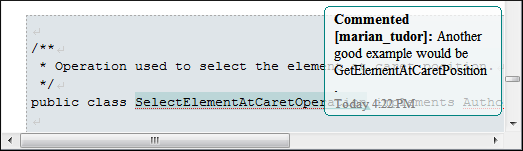
Figure: Transparent Callout
Note: Oxygen XML Editor does not display
callouts located in folded areas of the edited document.
The following actions are available in the contextual menu of an insertion or deletion
callout:
 Accept
Change - Select this option to accept the changes you or other authors make
to a document.
Accept
Change - Select this option to accept the changes you or other authors make
to a document. Reject
Change - Select this option to reject the changes you or other authors make
to a document.
Reject
Change - Select this option to reject the changes you or other authors make
to a document. Comment
Change - Select this option to comment an existing change in your document.
You are also able to add a comment to a change from the Comment Change
button available on the Review toolbar.
Comment
Change - Select this option to comment an existing change in your document.
You are also able to add a comment to a change from the Comment Change
button available on the Review toolbar. - Edit Reference - If the fragment that contains a callout is a reference, use this option to go to the reference and edit the callout.
 Callouts
Options - Select this option to open a preferences
page where you can configure the callout options.
Callouts
Options - Select this option to open a preferences
page where you can configure the callout options.
The following options are available in the contextual menu of a comment callout:
 Edit
Comment - Select this option to modify the content of a comment
callout.Note: The text area is disabled if you are not the author which inserted the comment.
Edit
Comment - Select this option to modify the content of a comment
callout.Note: The text area is disabled if you are not the author which inserted the comment. Remove
Comment - Select this option to remove a comment callout.
Remove
Comment - Select this option to remove a comment callout.- Edit Reference - If the fragment that contains a callout is a reference, use this option to go to the reference and edit the callout.
- Callouts
Options - Select this option to open a preferences
page where you can configure the callout options.
When you print a document from Oxygen XML Editor, all callouts you, or other authors added to the document are printed. For a preview of the document and its callouts, go to .
To watch our video demonstration about the Callouts support, go to http://oxygenxml.com/demo/CalloutsSupport.html.
