The XPath/XQuery Builder view allows you to compose complex XPath and XQuery expressions and execute them over the currently edited XML document. For XPath 2.0 / 3.0, or XQuery expressions, you are able to use the doc() function to specify the source file over which the expressions are executed. When you connect to a database, the expressions are executed over that database. If you are using the XPath/XQuery Builder view and the current file is an XSLT document, Oxygen XML Developer plugin executes the expressions over the XML document in the associated scenario.
To open the XPath/XQuery Builder view, go to .
The upper part of the view contains the following actions:
-
A drop-down menu that allows you to select the type of the expression you want to execute. You can choose between:
- XPath 1.0 (Xerces-driven)
- XPath 2.0, XPath 2.0SA, XPath 3.0, XPath 3.0SA, XQuery 1.0, XQuery 3.0, Saxon-HE XQuery, Saxon-PE XQuery, or Saxon-EE XQuery (all of them are Saxon-driven)
- Custom connection to XML databases that can execute XQuery expressionsNote: The results returned by XPath 2.0 SA and XPath 3.0 SA have a location limited to the line number of the start element (there are no column information and no end specified).Note: Oxygen XML Developer plugin uses Saxon to execute XPath 3.0 expressions. Since Saxon implements a part of the 3.0 functions, when using a function that is not implemented, Oxygen XML Developer plugin returns a compilation error.
-
 Execute XPath button -
Press this button to start the execution of the XPath or XQuery expression you are
editing. The result of the execution is displayed in the Results
view in a separate tab
Execute XPath button -
Press this button to start the execution of the XPath or XQuery expression you are
editing. The result of the execution is displayed in the Results
view in a separate tab - Favorites button - Allows you to save certain expressions that you can later reuse. To add an expression as favorite, press the star button and enter a name under which the expression is saved. The star turns yellow to confirm that the expression was saved. Expand the drop-down menu next to the star button to see all your favorites. Oxygen XML Developer plugin automatically groups favorites in folders named after the method of execution
 History drop-down menu -
Keeps a list of the last 15 executed XPath or XQuery expressions. Use the
History drop-down menu -
Keeps a list of the last 15 executed XPath or XQuery expressions. Use the
 Clear
history action from the bottom of the list to remove them
Clear
history action from the bottom of the list to remove them Settings drop-down menu -
Contains the following three options:
Settings drop-down menu -
Contains the following three options: Update on caret move - When enabled and you navigate
through a document, the XPath expression corresponding to the XML node at the current cursor
position is displayed.
Update on caret move - When enabled and you navigate
through a document, the XPath expression corresponding to the XML node at the current cursor
position is displayed. Evaluate as you type - When you select this option, the XPath expression you
are composing is evaluated in real time.Note: TheEvaluate as you type option and the
automatic validation are disabled when the scope is other than Current
file.
Evaluate as you type - When you select this option, the XPath expression you
are composing is evaluated in real time.Note: TheEvaluate as you type option and the
automatic validation are disabled when the scope is other than Current
file. Options - Opens the Preferences page of the currently selected processing
engine.
Options - Opens the Preferences page of the currently selected processing
engine.
-
XPath scope menu - Oxygen XML Developer plugin allows you to define a scope on which the XPath operation will be executed. You can choose where the XPath expression will be executed:
 Current file - Current selected file only.
 Enclosing
project - All the files of the project that encloses the current edited
file.
Enclosing
project - All the files of the project that encloses the current edited
file. Workspace
selected files - The files selected in the workspace. The files are
collected from the last selected resource provider view (Navigator,
Project Explorer or Package
Explorer).
Workspace
selected files - The files selected in the workspace. The files are
collected from the last selected resource provider view (Navigator,
Project Explorer or Package
Explorer). All opened files - All files opened in the application.
 Opened
archive - Files open in the Archive
Browser view.
Opened
archive - Files open in the Archive
Browser view. Working sets - The selected working sets.
 Configure XPath working sets - Allows you to configure and manage
collections of files and folders, encapsulated in logical containers called working
sets.
Configure XPath working sets - Allows you to configure and manage
collections of files and folders, encapsulated in logical containers called working
sets. XPath file
filter - You can filter the files from the selected scope on which the XPath
expression will be executed. By default the XPath expression will be executed only on XML
files, but you can also define a set of patterns that will filter out files from the
current scope.
XPath file
filter - You can filter the files from the selected scope on which the XPath
expression will be executed. By default the XPath expression will be executed only on XML
files, but you can also define a set of patterns that will filter out files from the
current scope.
Figure: The XPath/XQuery Builder View
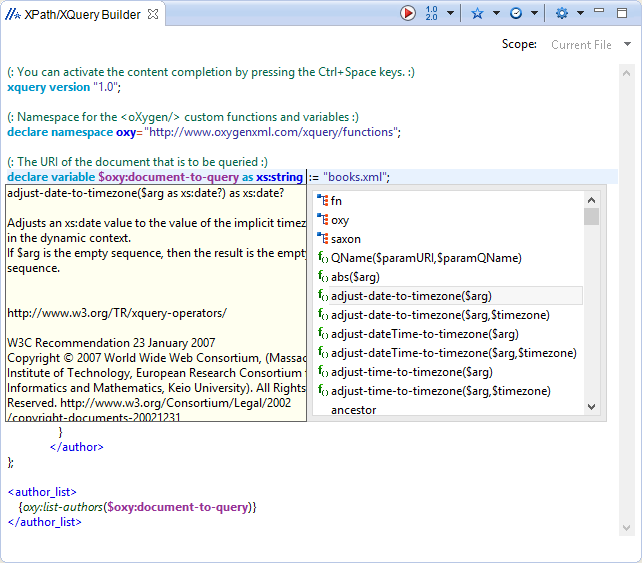
When you hover your cursor over the
XPath/XQuery version icon  , a tooltip is displayed to
let you know what engine Oxygen XML Developer plugin currently uses.
, a tooltip is displayed to
let you know what engine Oxygen XML Developer plugin currently uses.
While you edit an XPath or XQuery expression, Oxygen XML Developer plugin assists you with the
following features:
-
Content Completion Assistant - It offers context-dependent proposals and takes into account the cursor position in the document you are editing. The set of functions proposed by the Content Completion Assistant also depends on the engine version. Select the engine version from the drop-down menu available in the toolbar.
-
Syntax Highlight - Allows you to identify the components of an expression. To customize the colors of the components of the expression, open the Preferences dialog box and go to .
- Automatic validation of the expression as you type.Note: When you type invalid syntax a red serrated line underlines the invalid fragments.
- Function signature and documentation balloon, when the cursor is located inside a function.
