Editing with the Oxygen XML Web Author
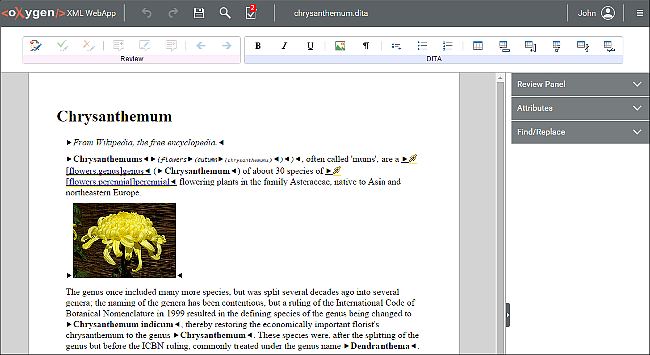
The interface of the Oxygen XML Web Author groups the available actions in the
following functional areas:
- On mobile devices the upper toolbar allows you to switch between the Edit and Review modes.
- The actions on the upper toolbar include Undo, Redo, Save, Find/Replace, and Validation Results. Also, clicking the Oxygen XML Web Author icon at the top-left corner of the screen will open the Dashboard page.
- The lower toolbar provides document-specific actions. For example, for DITA documents, the DITA toolbar presents DITA-specific actions. Also, it includes the Review toolbar that presents actions such as Track Changes, Add Comment, and more.
- The side panel includes tabs to switch between the Review, Attributes, and Find/Replace views.
Note: Some documents might be locked for editing. This means that you cannot alter their content
or add comments to them. A document lock state is indicated by a padlock icon next to the file
name.
Figure: Desktop Version of the Oxygen XML Web Author