Inserting BreakpointsHistory | Edit
Breakpoints can be set in XSLT/XQuery documents and XML documents in XSLT/XQuery debugging sessions.
To insert a breakpoint, follow these steps:
-
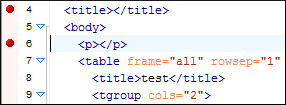
Click the vertical stripe on the left side of the editor
panel or select
 Create Breakpoint
(Shift+F7) from the menu.
Create Breakpoint
(Shift+F7) from the menu.
Once you insert a breakpoint, it is automatically added to the list in the Breakpoints view and you can edit its associated condition. A breakpoint can have an associated break condition that represents an XPath expression evaluated in the current debugger context. In order to be processed, their evaluation result should be a boolean value. A breakpoint with an associated condition only stops the execution of the Debugger if the breakpoint condition is evaluated as true.
Figure: Example: Breakpoints