XML Author
Oxygen XML Author 18.0
Index
  • Getting Started
    • What is Oxygen XML Author
    • Getting Familiar with the Layout
    • Resources to Help You Get Started Using Oxygen XML Author
    • Your First Document or Project
      • Your First XML Document
      • Your First DITA Topic
      • Creating a New Project
    • Getting Help
      • Help Menu
  • Editing Documents
    • Working with Unicode
      • Opening and Saving Unicode Documents
      • Inserting Symbols
      • Unicode Fallback Font Support
    • Creating and Working with Documents
      • Creating New Documents and Templates
      • Opening Documents
      • Saving Documents
      • Opening and Saving Remote Documents via FTP/SFTP/WebDAV/SharePoint
      • Switching Between Opened Tabs
      • Searching Documents
      • Closing Documents
      • Contextual Menu of the Current Editor Tab
      • Viewing File Properties
    • Using Projects to Group Documents
      • Creating a New Project
      • Project View
      • Sharing a Project - Team Collaboration
      • Defining Master Files at Project Level
    • Editing XML Documents
      • Editing XML Documents in Text Mode
      • Editing XML Documents in Grid Mode
      • Editing XML Documents in Author Mode
      • Validating XML Documents
      • Finding and Replacing Text in the Current File
      • Finding and Replacing Text in Multiple Files
      • Search and Refactor Actions for IDs and IDREFS
      • Search and Refactor Operations Scope
      • Associate a Schema to a Document
      • Working with Modular XML Files in the Master Files Context
      • XML Resource Hierarchy/Dependencies View
      • Working with XML Catalogs
      • Editing Large XML Documents with DTD Entities or XInclude
      • Viewing Status Information
      • Making a Persistent Copy of Results
      • Editor Highlights
      • Printing a File
      • XML Quick Fixes
      • Refactoring XML Documents
    • Editing CSS Stylesheets
      • Validating CSS Stylesheets
      • Content Completion in CSS Stylesheets
      • CSS Outline View
      • Folding in CSS Stylesheets
      • Formatting and Indenting CSS Stylesheets (Pretty Print)
      • Minifying CSS Stylesheets
    • Editing LESS CSS Stylesheets
      • Validating LESS Stylesheets
      • Content Completion in LESS Stylesheets
      • Compiling LESS Stylesheets to CSS
    • Editing StratML Documents
    • Editing XLIFF Documents
    • Editing JavaScript Documents
      • JavaScript Editor Text Mode
      • Validating JavaScript Files
      • Content Completion in JavaScript Files
      • JavaScript Outline View
    • Editing SVG Files
      • Standalone SVG Viewer
      • Integrated SVG Viewer in the Results Panel
    • Editing XHTML Documents
    • Spell Checking
      • Spell Checking Dictionaries
      • Learned Words
      • Ignored Words (Elements)
      • Automatic Spell Check
      • Spell Checking in Multiple Files
    • AutoCorrect Misspelled Words
      • Add Dictionaries for the AutoCorrect Feature
    • Loading Large Documents
      • File Sizes Smaller than 300 MB
      • File Sizes Greater than 300 MB
    • Scratch Buffer
    • Handling Read-Only Files
    • Editing Documents with Long Lines
    • XML Digital Signatures
      • Digital Signatures Overview
      • Certificates
      • Canonicalizing Files
      • Signing Files
      • Verifying Signature
      • Example of How to Digitally Sign XML Files or Content
    • Compare Files or Directories
      • Compare Files
      • Compare Directories
  • Publishing
    • Transformation Scenarios
      • Built-in Transformation Scenarios
      • Creating New Transformation Scenarios
      • Editing a Transformation Scenario
      • Duplicating a Transformation Scenario
      • Configure Transformation Scenario(s) Dialog Box
      • Apply Batch Transformations
      • Sharing the Transformation Scenarios
      • Transformation Scenarios View
      • Debugging PDF Transformations
      • Configuring Calabash with XEP
      • Integration of an External XProc Engine
      • XSLT Processors
      • XSL-FO Processors
    • WebHelp System Output
      • WebHelp Responsive System
      • WebHelp Classic System
      • WebHelp Classic Mobile System
      • Context-Sensitive WebHelp System
      • Using the Oxygen XML WebHelp Plugin to Automate Output
  • Databases and CMS
    • Working with Databases
      • Data Source Explorer View
      • Table Explorer View
      • Database Connection Support
      • WebDAV Connections
      • SQL Execution Support
    • Content Management System (CMS) Integration
      • Integration with Documentum (CMS) (deprecated)
      • Integration with Microsoft SharePoint
  1. Home
  2. Publishing
  3. WebHelp System Output
  4. WebHelp Responsive System
  5. WebHelp Responsive Template Mechanism
  6. WebHelp Responsive Template Pages
  7. WebHelp Responsive Index Terms Template

WebHelp Responsive Index Terms Template

This template is used when generating the page used to present index terms. This template should have a reference to the component that specifies where the index terms will be presented.

A sample index term page is:
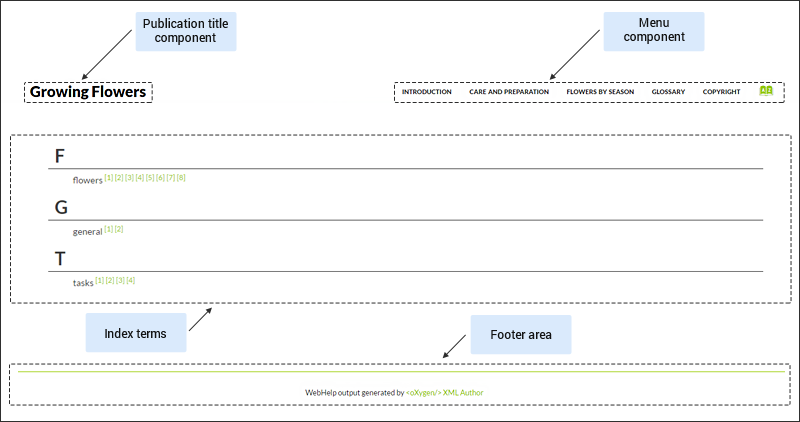
The components that can be used inside the search results page are:

  • Publication Title
  • Publication Logo
  • Search Input
  • Print Link
  • Main Page Menu
  • Index Terms Link
  • Publishing
    • Transformation Scenarios
    • WebHelp System Output
      • WebHelp Responsive System
        • WebHelp Responsive with Feedback System
        • WebHelp Responsive Template Mechanism
          • WebHelp Template Resources
          • WebHelp Responsive Template Pages
            • WebHelp Responsive Main Page Template
            • WebHelp Responsive Topic Template
            • WebHelp Responsive Search Results Template
            • WebHelp Responsive Index Terms Template
          • WebHelp Template Components
        • Customizing the WebHelp Responsive Output
      • WebHelp Classic System
      • WebHelp Classic Mobile System
      • Context-Sensitive WebHelp System
      • Using the Oxygen XML WebHelp Plugin to Automate Output