Rendering XML Documents in Author Mode
The structure of an XML document and the required restrictions on its elements and their attributes are defined with an XML schema. This makes it easier to edit XML documents in a visual editor. For more information about schema association, see the Associate a Schema to a Document section. The Author mode renders the content of the XML documents visually, based on a CSS stylesheet associated with the document.
Associating a Stylesheet with an XML Document
The rendering of an XML document in the Author mode is driven by a CSS stylesheet that conforms to the version 2.1 of the CSS specification from the W3C consortium. Some CSS 3 features, such as namespaces and custom extensions, of the CSS specification are also supported. Oxygen XML Author also supports stylesheets coded with the LESS dynamic stylesheet language.
- Insert the
xml-stylesheetprocessing instruction with thetypeattribute at the beginning of the XML document. If you do not want to alter your XML documents, you should create a new document type (framework).CSS example:<?xml-stylesheet type="text/css" href="test.css"?>
LESS example:<?xml-stylesheet type="text/css" href="test.less"?>
Note: XHTML documents need alinkelement, with thehrefandtypeattributes in theheadchild element, as specified in the W3C CSS specification. XHTML example:<link href="/style/screen.css" rel="stylesheet" type="text/css"/>
Tip: You can also insert thexml-stylesheetprocessing instruction by using the Associate XSLT/CSS
Stylesheet action that is available on the toolbar or in the
menu.
Associate XSLT/CSS
Stylesheet action that is available on the toolbar or in the
menu. - Configure a Document Type Association by adding a new CSS or LESS file in the
settings. To do so, open the
Preferences dialog box and go to
Document Type Association. Edit the appropriate framework, open
the Author tab, then the CSS tab. Press
the
 New button to add a new
CSS or LESS file.Note: The Document Type Associations are read-only, so you need to extend an existing one.
New button to add a new
CSS or LESS file.Note: The Document Type Associations are read-only, so you need to extend an existing one.
You can read more about associating a CSS to a document in the section about customizing the CSS of a document type.
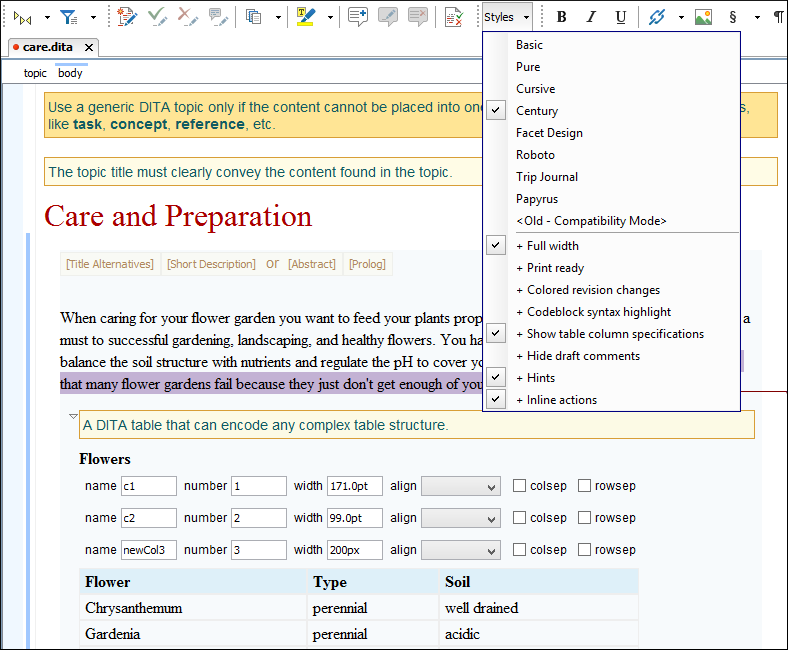
If a document has no CSS association or the referenced stylesheet files cannot be loaded, a default one is used. A warning message is also displayed at the beginning of the document, presenting the reason why the CSS cannot be loaded.
Figure: Document with no CSS association default rendering
Selecting and Combining Multiple CSS Styles
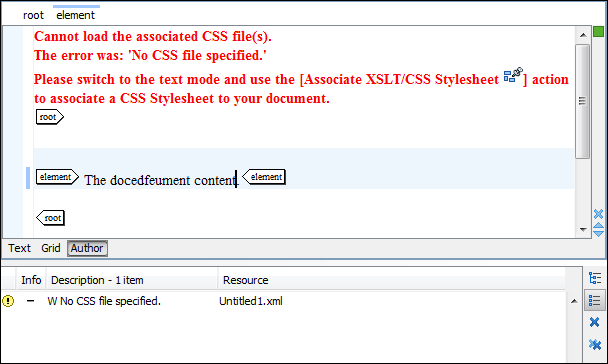
Oxygen XML Author provides a Styles drop-down menu on the Author Styles toolbar that allows you to select one main (non-alternate) CSS style and multiple alternate CSS styles. An option in the preferences can be enabled to allow the alternate styles to behave like layers and be combined with the main CSS style. This makes it easy to change the look of the document.
Figure: Styles Drop-down Menu in a DITA Document