MarkLogic Database Connections
Oxygen XML Author includes support for MarkLogic database connections. Once you configure a MarkLogic connection, you
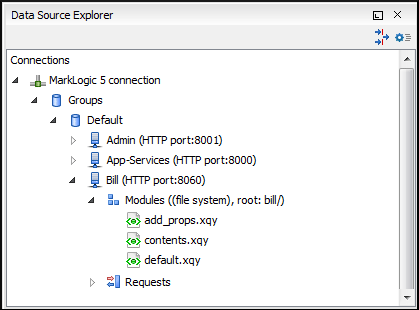
can use the Data Source Explorer view to display all the application
servers that are configured on the MarkLogic server. You can expand each application server
and view all of its configured modules, and the Data Source Explorer
view allows you to open and edit these modules.
Note: To browse modules located in a database,
directory properties must be associated with them. These directory properties are generated
automatically if the directory creation property of the database is set to
automatic. If this property is set to manual or manual-enforced,
add the directory properties of the modules manually, using the XQuery function
xdmp:directory-create(). For example, for two documents with the
/code/modules/main.xqy and
/code/modules/imports/import.xqy IDs, run the following
query:(xdmp:directory-create('/code/modules/'), xdmp:directory-create('/code/modules/imports/'))
For more information about directory properties, go to: http://blakeley.com/blogofile/2012/03/19/directory-assistance/.
MarkLogic and XQuery
MarkLogic connections can be used in conjunction with XQuery scripts to debug and solve problems with XQuery transformations. XQuery modules can also be validated using a MarkLogic server to allow to you to spot possible issues without the need of actually executing the XQuery script.
Modules Container
For each Application server (for example: Bill (HTTP port:8060)), you have access to
the XQuery modules that are visible to that server. When editing, executing, or debugging
XQuery it is recommended to open the XQuery files from this  Modules container.
Modules container.Note: You can also manage
resources for a MarkLogic database through a WebDAV connection, although it is not
recommended if you work with XQuery files since imported modules may not be resolved
correctly.
Requests Container
Each MarkLogic application server includes a Requests
container. In this container, Oxygen XML Author displays both queries that are stopped
for debugging purposes and queries that are still running. To clean up the entire
Requests container at the end of your session, right-click it and use
the Cancel all requests action.
Requests
container. In this container, Oxygen XML Author displays both queries that are stopped
for debugging purposes and queries that are still running. To clean up the entire
Requests container at the end of your session, right-click it and use
the Cancel all requests action.Figure: MarkLogic Connection in Data Source Explorer