By default, you can type only in elements which accept text content. So if the element is declared as empty or element only in the associated schema you are not allowed to insert text in it. This is also available if you try to insert CDATA inside an element. Instead, a warning message is displayed:
Figure: Editing in empty element warning
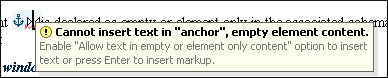
You can disable this behavior by checking the Allow Text in empty or element only content check box in the Author preferences page.
Entire sections or chunks of data can be moved or copied by using the drag and drop support. The following situations can be encountered:
- When both of the drag and drop sources are from the Author mode editor, a well-formed XML fragment is transferred. The section is balanced before dropping it by adding matching tags when needed.
- When the drag source is from the Author mode editor but the drop target is a text-based editor, only the text inside the selection is transferred as it is.
- The text dropped from another text editor or another application into the Author mode editor is inserted without changes.
The font size of the current visual editor can be
increased and decreased on the fly with the same actions as in the Text mode:
- Ctrl NumPad+[plus sign] (Command NumPad+[plus sign] on OS X) or Ctrl NumPad-[minus sign] (Command NumPad-[minus sign] on OS X) or Ctrl Scroll Forward (Command Scroll Forward on OS X ) - Increases font size.
- Ctrl NumPad-[minus sign] (Command NumPad-[minus sign] on OS X) or Ctrl -[minus sign] (Command - on OS X) or Ctrl Scroll Backwards (Command Scroll Backwards on OS X) - Decreases font size.
- Ctrl NumPad0 (Command NumPad0 on OS X) or Ctrl 0 (Command 0 on OS X) - Restores font size to the size specified in Preferences.
Removing the Text Content of the Current Element
You can remove the text content of the current element and keep only the markup by
highlighting the appropriate block of content and use the  Remove Text action
that is available in the Refactoring submenu of the contextual
menu. This is useful when the markup of an element must be preserved,
for example a table structure but the text content must be replaced.
Remove Text action
that is available in the Refactoring submenu of the contextual
menu. This is useful when the markup of an element must be preserved,
for example a table structure but the text content must be replaced.
