You can use form controls in Author mode in a variety of ways to make
it easier to capture, organize, and edit content. Oxygen XML Editor includes built-in form controls that can
be used by content authors in Author mode. The types of built-in form
controls that you can use include the following:
- Text Field - A graphical user interface box that allows you to enter a single line of text.
- Combo Box - A graphical user interface object that can be a drop-down menu or a combination of a drop-down menu and a single-line text field.
- Check Box - A graphical user interface box that you can click to select or deselect a value.
- Pop-up - A contextual menu that provides quick access to various actions.
- Button - A graphical user interface object that performs a specific action.
- Button Group - A graphical user interface group of buttons (such as radio buttons) that perform specific actions.
- Text Area - A box that allows you to enter multiple lines of text.
- URL Chooser - A dialog box that allows you to select the location of local or remote resources.
- Date Picker - A form control object that allows you to select a date in a specified format.
- HTML Content - A graphical user interface box that is used for rendering HTML content.
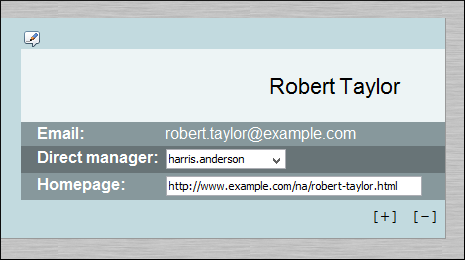
The following image is an example of how form controls can be used by content authors in
Author mode. It includes several button form controls, a combo box,
and a text field. The  icon is a
button form control that is assigned a specific action that changes the layout to an editing
mode. The [ + ] and [ - ] icons are also button
form controls that are assigned specific actions to add or delete records from the document.
The Direct manager row includes a combo box form control that is both a drop-down menu
and an editable text field, while the Homepage row includes a simple editable text
field form control.
icon is a
button form control that is assigned a specific action that changes the layout to an editing
mode. The [ + ] and [ - ] icons are also button
form controls that are assigned specific actions to add or delete records from the document.
The Direct manager row includes a combo box form control that is both a drop-down menu
and an editable text field, while the Homepage row includes a simple editable text
field form control.
Figure: Example of Form Controls in Author Mode
You can use your imagination to envision the multitude of ways that you can use form controls to make the editing experience for content authors easier and more efficient. As a working example, a bundled samples project (located in the samples folder inside the Oxygen XML Editor installation directory) contains a file called personal.xml that contains form controls. You can use this file, along with its corresponding personal.css file (form controls are defined in the CSS) to experiment with an example of how form controls can be implemented in Author mode.
