When the cursor is positioned inside a new context, a tooltip will be shown for a couple of seconds displaying the position of the cursor relative to the current element context.
Here are the common situations that can be encountered:
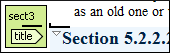
- The cursor is positioned before the first block child of the current node.
Figure: Before first block
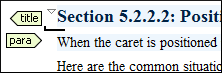
- The cursor is positioned between two block elements.
Figure: Between two block elements
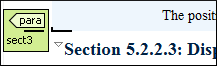
- The cursor is positioned after the last block element child of the current node.
Figure: After last block
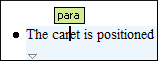
- The cursor is positioned inside a node.
Figure: Inside a node
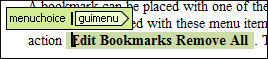
- The cursor is positioned inside an element, before an inline child element.
Figure: Before an inline element
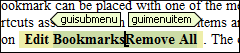
- The cursor is positioned between two inline elements.
Figure: Between two inline elements
- The cursor is positioned inside an element, after an inline child element.
Figure: After an inline element

The nodes in the previous cases are displayed in the tooltip window using their names.
To deactivate this feature, open the Preferences dialog box and go to . Even if this option is disabled, you can trigger the display of the position tooltip by pressing Shift+F2.
Note: The position information tooltip is not displayed if one of the modes Full Tags with
Attributes or Full Tags is selected.
Location Tooltip
When editing XML documents in a visual environment you might find it difficult to position
the cursor between certain tags that do not have a visual representation. To counterbalance
this, Oxygen XML Editor displays a transparent preview of the Position Information
Tooltip, called Location Tooltip: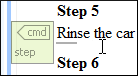
Figure: Location Tooltip
Oxygen XML Editor displays a location tooltip when the following conditions are met:
- You are editing the document in one of the following tags display modes: Inline Tags, Partial Tags, No Tags.
- The mouse pointer is moved between block elements.
To activate or deactivate this feature, use the Show location tooltip on mouse move option from the Cursor Navigation preferences page.
