The Palette view is designed to offer quick access to XML Schema components and to improve the usability of the XML Schema diagram builder. You can use the Palette to drag and drop components in the Design mode. The components offered in the Palette view depend on the XML schema version set in the XML Schema preferences page.
Figure: Palette View
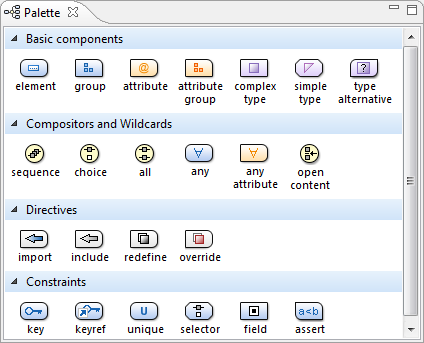
Components are organized functionally into 4 collapsible categories:
- Basic components: elements, group, attribute, attribute group, complex type, simple type, type alternative.
- Compositors and Wildcards: sequence, choice, all, any, any attribute, open content.
- Directives: import, include, redefine, override.
- Identity constraints: key, keyref, unique, selector,
field, assert.Note: The type alternative, open content, override, and assert components are available for XML Schema 1.1.
- Click and hold a graphic symbol from the Palette view, then drag the component into the Design view.
- A line dynamically connects the component with the XML schema structure.
- Release the component into a valid position. Note: You cannot drop a component into an invalid position. When you hover the component into an invalid position, the mouse cursor changes its shape into
 . Also, the
connector line changes its color from the usual dark gray to the color defined in the
Validation error highlight color option
(default color is red).
. Also, the
connector line changes its color from the usual dark gray to the color defined in the
Validation error highlight color option
(default color is red).
To watch our video demonstration about the Schema palette and developing XML Schemas, go to http://oxygenxml.com/demo/Schema_Palette.html and http://oxygenxml.com/demo/Developing_XML_Schemas.html respectively.
