The Resource Hierarchy/Dependencies view allows you to see the
hierarchy/dependencies for a WSDL resource. To open this view, go to
.
Note: The hierarchy of a WSDL resource includes the hierarchy of imported XML
Schema resources. The dependencies of an XML Schema resource present the WSDL documents that
import the schema.
To view the hierarchy of a WSDL document, select the document in the project view and choose
Resource Hierarchy from the contextual menu. 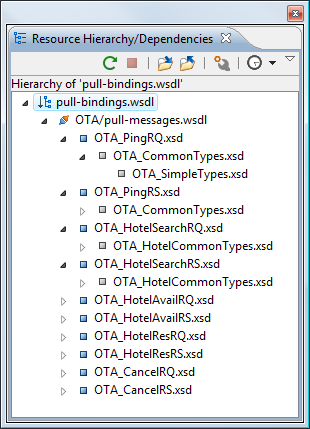 If you want to see the dependencies of a WSDL document, select the document in the
project view and choose Resource Dependencies from the contextual menu.
If you want to see the dependencies of a WSDL document, select the document in the
project view and choose Resource Dependencies from the contextual menu.
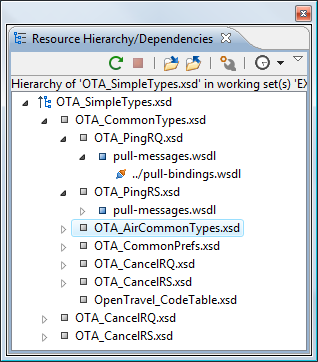
Figure: Resource Hierarchy/Dependencies View
Figure: Resource Hierarchy/Dependencies View
The following actions are available in the
Resource Hierarchy/Dependencies view:
 Refresh
- Refreshes the Hierarchy/Dependencies structure.
 Stop
Stop- Stops the hierarchy/dependencies computing.
 Show
Hierarchy
Show
Hierarchy- Allows you to choose a resource to compute the hierarchy structure.
 Show
Dependencies
Show
Dependencies- Allows you to choose a resource to compute the dependencies structure.
 Configure
- Allows you to configure a scope to compute the dependencies structure. There is also an option for automatically using the defined scope for future operations.
 History
- Provides access to the list of previously computed dependencies. Use the
 Clear history button
to remove all items from this list.
Clear history button
to remove all items from this list.
The contextual menu contains the following actions:
- Open
- Opens the resource. You can also double-click a resource in the Hierarchy/Dependencies structure to open it.
- Copy location
- Copies the location of the resource.
- Move resource
- Moves the selected resource.
- Rename resource
- Renames the selected resource.
- Show Resource Hierarchy
- Shows the hierarchy for the selected resource.
- Show Resource Dependencies
- Shows the dependencies for the selected resource.
 Add to
Master Files
Add to
Master Files- Adds the currently selected resource in the Master Files directory.
- Expand All
- Expands all the children of the selected resource from the Hierarchy/Dependencies structure.
- Collapse All
- Collapses all children of the selected resource from the Hierarchy/Dependencies structure.
Tip: When a recursive reference is encountered in the Hierarchy
view, the reference is marked with a special icon  .
.
.Note: The Move resource or Rename resource
actions give you the option to update the references to the resource.
