To edit an existing document type action or create a new one, open the
Preferences dialog box, go to , select a document type, and click Edit or
New. The Document
type configuration dialog box is presented. In this dialog box, go to
the Author tab, click Actions, select an action,
and click  Edit, or to create a new
action click
Edit, or to create a new
action click  New.
New.
Figure: The Action Dialog Box
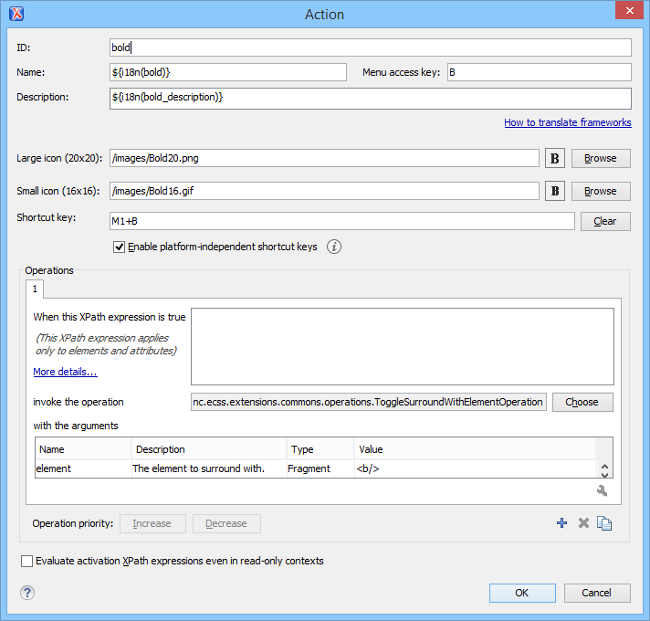
The following options are available in the Action dialog box:
- ID - Specifies a unique action identifier.
- Name - Specifies the name of the action. This name is displayed as a tooltip or as a menu item.
- Menu access key - In Windows, the menu items are accessed using the shortcut when the menu is visible. The letter is visually represented by underlining the first occurrence of the letter in the menu item Name.
- Description - A description of the action.
- Large icon - Allows you to select an image for the icon that Oxygen XML Developer plugin uses for the toolbar action.Tip: A good practice is to store the image files inside the framework directory and use the ${frameworks} editor variable to make the image relative to the framework location. If the images are bundled in a jar archive (for instance, along with some Java operations implementation), it is convenient to reference the images by their relative path location in the class-path.
- Small icon - Allows you to select an image for the icon that Oxygen XML Developer plugin uses for the contextual menu action.
- Shortcut key - This field allows you to configure a shortcut key
for the action that you are editing. The + character separates the keys.
If the Enable platform-independent shortcut keys checkbox is
enabled, the shortcut that you specify in this field is platform-independent and the
following modifiers are used:
- M1 represents the Command key on MacOS X, and the Ctrl key on other platforms.
- M2 represents the Shift key.
- M3 represents the Option key on MacOS X, and the Alt key on other platforms.
- M4 represents the Ctrl key on MacOS X, and is undefined on other platforms.
- Operations
In this section of the Action dialog box, you configure the functionality of the action that you are editing. An action has one or more operation modes. The evaluation of an XPath expression activates an operation mode. The first enabled operation mode is activated when you trigger the action. The scope of the XPath expression must consist only of element nodes and attribute nodes of the edited document. Otherwise, the XPath expression does not return a match and does not fire the action. For more details see: Activation of Multiple Functions for Actions using XPath Expressions.
The following options are available in this section:- When this XPath expression is true - An XPath 2.0 expression that applies to elements and attributes. For more details see:Activation of Multiple Functions for Actions using XPath Expressions.
- invoke the operation - Specifies the invoked operation.
- with the arguments - Specifies the arguments of the invoked operation.
- Edit - Allows you to edit the arguments of the operation.
- Operation priority - Increases or decreases the priority of an
operation. The operations are invoked in the order of their priority. If more than one
XPath expression is true, the operation with the highest priority is invoked.
- Add - Adds an operation.
- Remove - Removes an operation.
- Duplicate - Duplicates an operation.
- Evaluate activation XPath expressions even in read-only cotnexts - If this checkbox is enabled, the action can be invoked even when the cursor is placed in a read-only location.
