The JSON Outline view displays the list of all the components of the JSON document you are editing. To enable the JSON Outline view, go to .
Figure: The JSON Outline View
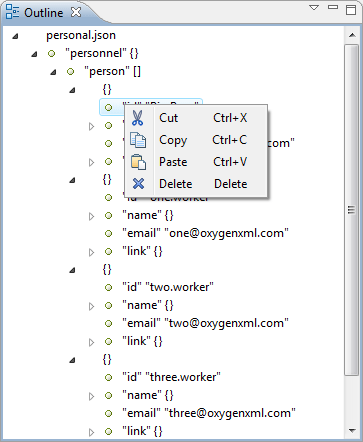
The following actions are available in the contextual menu of the JSON
Outline view:
 Cut
Cut Copy
Copy Paste
Paste Delete
The View menu on
the JSON Outline view action bar allows you to enable
 Selection
update on cursor move. This option controls the synchronization between the
Outline view and source the document. Oxygen XML Developer plugin
synchronizes the selection in the Outline view with the cursor moves or
the changes you make in the JSON editor. Selecting one of the components from the
Outline view also selects the corresponding item in the source
document.
Selection
update on cursor move. This option controls the synchronization between the
Outline view and source the document. Oxygen XML Developer plugin
synchronizes the selection in the Outline view with the cursor moves or
the changes you make in the JSON editor. Selecting one of the components from the
Outline view also selects the corresponding item in the source
document.
