To generate HTML documentation for an XQuery document, use the XQuery Documentation dialog box. It is opened with the XQuery Documentation action that is available from the menu or from the Generate XQuery Documentation action from the contextual menu of the Navigator view.
The dialog box allows you to configure a set of parameters for the process of generating the HTML documentation.
Figure: The XQuery Documentation Dialog Box
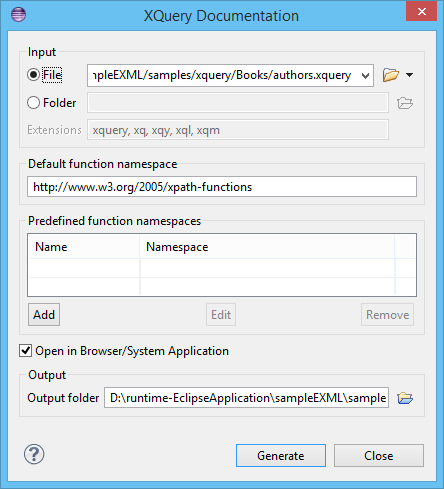
The following options are available:
-
Input - The full path to the XQuery file must be specified in one of
the two fields in this section:
- URLFile - The URL of the file in which you want to generate the documentation.
- Folder - The directory that contains the files for which you want to generate the documentation. You can also specify the XQuery file extensions to be searched for in the specified directory.
- Default function namespace - Optional URI for the default namespace for the submitted XQuery.
- Predefined function namespaces - Optional, engine-dependent, predefined namespaces that the submitted XQuery refers to. They allow the conversion to generate annotation information to support the presentation component hypertext linking (only if the predefined modules have been loaded into the local xqDoc XML repository).
-
Open in Browser/System Application - Select this option if you want
the result to be opened in the system application associated with that file type.Note: To set the browser or system application that will be used, open the Preferences dialog box, then go to . This will take precedence over the default system application settings.
- Output - Allows you to specify where the generated documentation is saved on disk.
