An XML document is organized as a tree of elements. When working on a large document you can collapse some elements, leaving only the ones you need to edit in the focus. Expanding and collapsing works on individual elements. Expanding an element leaves the child elements unchanged.
Figure: Folding of the XML Elements
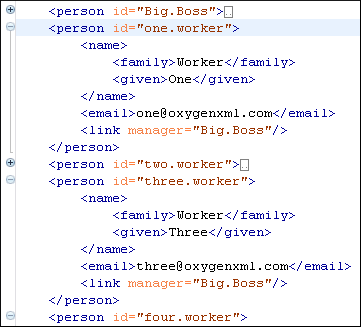
To toggle the folded state of an element, click the special mark displayed in the left part of the document editor, next to the start tag of that element.
The following other menu actions related to folding of XML elements are available from the contextual menu of the current editor:
 Collapse Other Folds (Ctrl NumPad / (Meta NumPad / on OS X))
- Folds all the elements except the current element.
 Collapse Child Folds
(Ctrl + NumPad- (Meta + NumPad-
on OS X))
Collapse Child Folds
(Ctrl + NumPad- (Meta + NumPad-
on OS X))- Folds the elements indented with one level inside the current element.
 Expand Child Folds
(Ctrl NumPad+ (Meta NumPad+ on OS
X))
Expand Child Folds
(Ctrl NumPad+ (Meta NumPad+ on OS
X))- Unfolds all child elements of the currently selected element.
 Expand All (Ctrl NumPad * (Meta NumPad * on OS
X))
Expand All (Ctrl NumPad * (Meta NumPad * on OS
X))- Unfolds all elements in the current document.
To watch our video demonstration about the folding support in Oxygen XML Developer plugin, go to http://oxygenxml.com/demo/FoldingSupport.html.
