To access the Open using FTP/SFTP/WebDAV dialog box, go
to menu, then choose the  Browse for remote file option from the drop-down action
list.
Browse for remote file option from the drop-down action
list.
Figure: Open URL Dialog Box
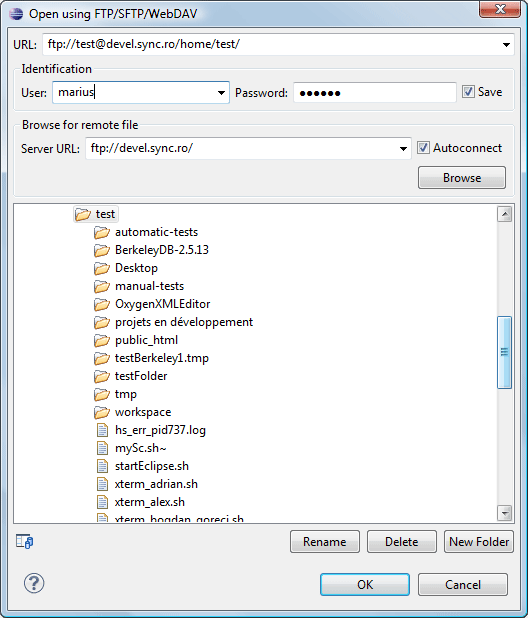
The displayed dialog box is composed of several parts:
-
The editable URL combo box, in which you specify the URL to be opened or saved.Tip: You can type a URL like: ftp://anonymous@some.site/home/test.xml, if the file is accessible through an anonymous FTP.This combo box also displays the current selection when you change selection by browsing the tree of folders and files on the server.
-
The Identification section contains the access credentials. If you want to browse for a file on a server, you have to specify the user and password. This information is bound to the selected URL and is also used in opening or saving the file. If the Save check box is selected, the user and password are saved between editing sessions. The password is encrypted and kept in the options file.Note: Your password is well protected. If the options file is used on another machine by a user with a different user name the password, it will become unreadable since the encryption is user-name dependent. This is also true if you add URLs to your project that include a user and password.
-
The Browse for remote file section contains the Server URL combo box and Autoconnect check box. In the Server URL combo box, you can specify the protocol, the server host name, or server IP.Tip: When accessing a FTP server, you only need to specify the protocol and the host (such as ftp://server.com or if using a nonstandard port ftp://server.com:7800/).
By pressing the Browse button, the directory listing will be shown in the component. When Autoconnect is selected, every time the dialog box is displayed, the browse action will be performed.
-
The bottom part of the dialog box displays the tree view of the documents stored on the server. You can browse the directories and make multiple selections. Additionally, you can use the Rename, Delete, and New Folder actions to manage the file repository.
The file names are sorted in a case-insensitive manner.
