The Generate/Convert Schema dialog box allows you to convert a DTD or Relax NG (full or compact syntax) schema or a set of XML files to an equivalent XML Schema, DTD or Relax NG (full or compact syntax) schema. Where perfect equivalence is not possible due to limitations of the target language, Oxygen XML Developer plugin generates an approximation of the source schema. Oxygen XML Developer plugin uses Trang multiple format converter to perform the actual schema conversions.
To open the Generate/Convert Schema dialog box, select the  Generate/Convert Schema(Ctrl +
Shift + \ (Meta + Shift + \ on OS X)) action from the XML Tools menu.
Generate/Convert Schema(Ctrl +
Shift + \ (Meta + Shift + \ on OS X)) action from the XML Tools menu.
Figure: Convert a Schema to Other Schema Language
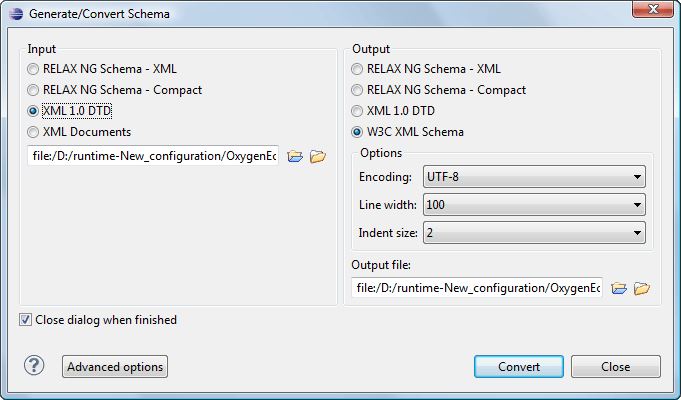
The language of the target schema is specified with one of the four options in the Output panel. Here you can also choose the encoding, the maximum line width and the number of spaces for one level of indentation.
The conversion can be further fine-tuned by specifying more advanced options available from the Advanced options button. For example if the input is a DTD and the output is an XML Schema the following options are available:
Input panel:
- xmlns - Specifies the default namespace, that is the namespace used for unqualified element names.
- xmlns - Each row specifies the prefix used for a namespace in the input schema.
- colon-replacement - Replaces colons in element names with the specified chars when constructing the names of definitions used to represent the element declarations and attribute list declarations in the DTD.
- element-define - Specifies how to construct the name of the definition representing an element declaration from the name of the element. The specified value must contain exactly one percent character. This percent character is replaced by the name of element (after colon replacement) and the result is used as the name of the definition.
- inline-attlist - Instructs the application not to generate definitions for attribute list declarations, but instead move attributes declared in attribute list declarations into the definitions generated for element declarations. This is the default behavior when the output language is XSD.
- attlist-define - Specifies how to construct the name of the definition representing an attribute list declaration from the name of the element. The specified value must contain exactly one percent character. This percent character is replaced by the name of element (after colon replacement) and the result is used as the name of the definition.
- any-name - Specifies the name of the definition generated for the content of elements declared in the DTD as having a content model of ANY.
- strict-any - Preserves the exact semantics of ANY content models by using an explicit choice of references to all declared elements. By default, the conversion engine uses a wildcard that allows any element
- generate-start - Specifies whether the conversion engine should generate a start element. DTD's do not indicate what elements are allowed as document elements. The conversion engine assumes that all elements that are defined but never referenced are allowed as document elements.
- annotation-prefix - Default values are represented using an annotation attribute prefix:defaultValue where prefix is the specified value and is bound to http://relaxng.org/ns/compatibility/annotations/1.0 as defined by the RELAX NG DTD Compatibility Committee Specification. By default, the conversion engine will use a for prefix unless that conflicts with a prefix used in the DTD.
Output panel:
- disable-abstract-elements - Disables the use of abstract elements and substitution groups in the generated XML Schema. This can also be controlled using an annotation attribute.
- any-process-contents - One of the values: strict, lax, skip. Specifies the value for the processContents attribute of any elements. The default is skip (corresponding to RELAX NG semantics) unless the input format is DTD, in which case the default is strict (corresponding to DTD semantics).
- any-attribute-process-contents - Specifies the value for the processContents attribute of anyAttribute elements. The default is skip (corresponding to RELAX NG semantics).
